Process Scheduling & Time UNIX Operating system
Process Scheduling & Time UNIX Operating system

Process Scheduling & Time UNIX Operating system
E N D
Presentation Transcript
Process Scheduling & Time---UNIX Operating system Prepared By:Ayan Banerjee Master of Technology (M.tech Computer Science and Engineering) https://www.sonjukta.com/About.html
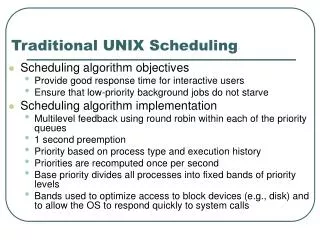
Process Scheduling & Time UNIX is a time sharing system, the kernel allocates the CPU to a process for a period of small time fraction , this is called time slice or time quantum When the time slice expires, system reschedules the process to continue execution at a later time slot. There are scheduler function on the UNIX system , which schedule process to schedule next every active process has a scheduling priority. Kernel switches context to the process which has highest priority. The kernel recalculates the priority of the running process when it returns from kernel
Process Scheduling & Time When process shift from kernel mode to user mode, process priority periodically readjusts for "ready -to-run" process. user mode. PROCESS SCHEDU LING: The scheduler on the UNIX system is general class of operating system , schedulers works on round robin with multilevel feedback, meaning that the kernel allocates efficiently. CPU to a process for a time quantum (very small time), release a process that exceeds its time quantum, then and sends it back into one of several priority queues. A process may need several iteration through the "feedback loop" to complete. When the kernel does a context switch and restores the context of a process, the process stars execution from the point where it had been suspended.
Process Scheduling & Time Algorithm: After a context switch, the kernel executes algorithm to schedule a process, selecting the highest priority process from those in the states "ready to run then loaded in memory" and “preempted ". A process should loaded in memory, since it cannot execute until it is swapped in. In case several processes marks for highest priority, the kernel picks processes "ready to run" for the longest time If there are no processes eligible for execution, the processor idles until the next processes appear on the que. Interrupt , which may happen in at most one clock tick , after handling that interrupt, the kernel again attempts to schedule a process to run.
Process Scheduling & Time Scheduling Parameters each process table entry contains a priority field for process The priority of a process in user mode is a function of its recent CPU usage, with processes getting a lower priority if they have recently used the CPU. Two kind of priorities can be partitioned into two classes : user priorities and kernel priorities. Each class contains several priority values, and each priority has a queue of processes logically associated with it. Processes with user level priorities were preempted on their return from the kernel to user mode, and processes with kernel -level priorities achieved them in the sleep algorithm. User level priorities are below a threshold value, and kernel -level priorities are above the threshold value. Kernel -level priorities are further subdivided: Processes with low kernel
Process Scheduling & Time Processes with low kernel priority wake up immediately on receiving a signal, whereas processes with high kernel priority continue sleeping to protect critical system operations from interruption. The double line between “waiting for child exit” and “user level 0” marks the boundary between system priorities and user priorities. High, non-interruptible system priorities include the swapper, disk I/O wait, buffer wait, and inode wait, with 1, 3, 2, and 1 processes queued at these levels. In contrast, interruptible system priorities such as TTY input, TTY output, and child exit wait have 4, 0, and 2 processes queued. User processes are grouped into user level 0 through user level n, containing 0, 4, and 1 processes respectively
Process Scheduling & Time The kernel computes process priorities in specific states. When a process is about to sleep, it is assigned a fixed priority based solely on the reason for sleeping, with the value hard-coded for each sleep condition and independent of whether the process is CPU-bound or I/O-bound. When a process returns from kernel mode to user mode, the kernel recalculates its priority. Additionally, the clock handler periodically updates the priorities of user- mode processes, typically every one second in System V, and then triggers the scheduling algorithm.
Process Scheduling & Time To prevent any process from monopolizing the CPU, the kernel continuously monitors CPU usage using clock interrupts. During each time quantum, the clock handler updates the recent CPU usage of a process at every clock tick. In System V, this value is periodically reduced using a decay function, CPU = CPU / 2, applied once per second. After updating the CPU usage, the kernel recalculates the priority of all processes in the preempted but ready-to-run state using the formula: priority = (recent CPU usage / 2) + base level user priority, where the base-level user priority defines the boundary between kernel and user mode, and a lower numeric value indicates a higher scheduling priority.
Process Scheduling & Time When the kernel recalculates recent CPU usage and process priority, a slower decay rate causes the priority of a process to return to its base level more slowly. As a result, processes in the ready-to-run state tend to spread across multiple priority levels rather than remaining in a single queue. Since priority recomputation occurs once per second, user-level processes continuously move between different priority queues, and in a real system, most user- level processes frequently change their priority positions.
Process Scheduling & Time Although multiple priority queues exist in the system, only one is considered here for simplicity and better understanding. The kernel does not modify the priority of processes executing in kernel mode, and user- level processes are not permitted to enter kernel-level priority ranges unless they invoke a system call and transition into a sleep state. The kernel periodically(after fixed time) recalculates the priorities of all active processes, typically once every second, although the exact timing of this update may vary slightly depending on system conditions and system resource calculation.
Process Scheduling & Time In this scheduling scenario, processes begin with a user-level priority of 60 (in each case), and the system clock generates 60 interrupts per second. Since the processes do not issue system calls and no other processes are competing for the CPU, the kernel updates CPU usage using a decay function, where the recorded CPU time is halved periodically. Process priority is then recalculated , the calculation formula is priority = (CPU / 2) + 60. Additionally, processes can influence their scheduling behavior through the nice system call, which adjusts the process priority by adding a user- specified nice value to the priority calculation. This mechanism provides a basic way for users to lower or raise the scheduling preference of their processes ( not for each case).
Process Scheduling & Time The effect of the nice system call depends on the passed value to it, but only the superuser is permitted to assign nice values that increase a process’s scheduling priority or go below a defined threshold. Ordinary users can reduce their own process priority, which helps prevent long, computation-heavy tasks from negatively affecting other users—this cooperative behavior is the origin of the term nice. A process automatically inherits the nice value of its parent during a fork operation, and the nice system call applies only to the calling process. Consequently, administrators cannot directly lower the priority of already running processes and must terminate them if immediate control is required.
Process Scheduling & Time UNIX provides several time-related system calls, including stime, time, times, and alarm, where the first two manage global system time and the others track process-specific timing. The stime call allows only the superuser to set the system clock by assigning a value representing the number of seconds elapsed since 00:00:00 GMT on January 1, 1970, commonly known as the UNIX epoch. This value is maintained by the kernel and updated every second by the clock interrupt handler. The time system call retrieves the current system time and returns it to the calling process, a function widely used by commands such as date to display the current time.