Download
1 / 8
0 likes | 14 Vues
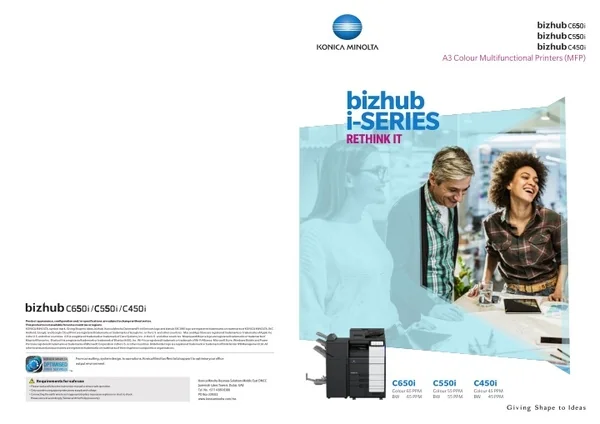
The i-Series houses a powerful engine, a quad-core central processing unit with standard 8 GB of memory and 256 GB SSD, which allows for quick-response, high-performance operations. With an additional combination of full-speed media printing range, high-speed single pass dual scan doc feeder as well as finishing options, digital skew correction, and large capability trays, expertly blends reliable functionality with versatile serviceability.<br><br>Source URL: https://www.konicaminolta.ae/business/WPBME/office-multifunctional-printer/office-colour-mfd/bizhub-c650i-c550i-c450i/

E N D
A3 Colour Multifunctional Printers (MFP) bizhub i-SERIES RETHINK IT Product appearance, configuration and/or specifications are subject to change without notice. This product is not available for some countries or regions. KONICA MINOLTA, symbol mark, Giving Shape to Ideas, bizhub, Konica Minolta Optimised Print Services logo and bizhub SECURE logo are registered trademarks or trademarks of KONICA MINOLTA, INC. Android, Google, and Google Cloud Print are registered trademarks or trademarks of Google Inc. in the U.S. and other countries. Mac and App Store are registered trademarks or trademarks of Apple Inc. in the U.S. and other countries. iOS is a registered trademark or trademark of Cisco Systems, Inc. in the U.S. and other countries. Mopria and Mopria logo are registered trademarks or trademarks of Mopria Alliance Inc. Bluetooth is a registered trademark or trademark of Bluetooth SIG, Inc. Wi-Fi is a registered trademark or trademark of Wi-Fi Alliance. Microsoft Store, Windows Mobile and Power Point are registered trademarks or trademarks of Microsoft Corporation in the U.S. or other countries. Bitdefender logo is a registered trademark or trademark of Bitdefender IPR Management Ltd. All other brands and product names are registered trademarks or trademarks of their respective companies or organisations. From consulting, system design, to operations, Konica Minolta offers total support to optimise your office output environment. C650i Colour 65 PPM BW 65 PPM C550i Colour 55 PPM BW 55 PPM C450i Colour 45 PPM BW 45 PPM Konica Minolta Business Solutions Middle East DMCC Jumeirah Lakes Towers, Dubai, UAE Tel. No. +971 4 880 8388 PO Box 338322 www.konicaminolta.com/me Requirements for safe use • Please read and follow the instruction manual to ensure safe operation. • Only operate using appropriate power supply and voltage. • Connecting the earth wire to an inappropriate place may cause explosion or electric shock. Please connect accordingly (Taiwan and the Philippines only).
2nd Generation bizhub bizhub i-SERIES TOMORROW’S WORKPLACE TODAY A NEW WAY OF WORKING HAS ARRIVED From an office hub to a partner that enhances your creativity. As office documents become more digitised and data volumes increase, document management and access assume more importance than ever. Remote access and cloud integration also heighten the need for security. Multifunctional Printers (MFP) are now expected to connect people, places and devices simply and safely and create a new way of working. We want to provide a new-value office that can be used intuitively by digital natives. That intent gave rise to the 2nd generation bizhub, the bizhub i-Series. MFPs have transitioned from an office hub to “a partner that enhances your creativity”, one that meets your diverse workstyles and business needs. “i” changes the office of the future from a customer perspective Why not embrace this smarter, simpler way of working? From an executive’s perspective Konica Minolta supports corporate governance through our services From an IT manager’s perspective Assures IT security and reduces managerial burden From a user perspective Prioritising the User Interface for simplicity and ease of use Delivering Simple, Secure and Convenient office work We innovate your business, processes and way of working SIMPLE SECURE SUSTAINABILE Thoroughly protecting office information Improved security of large-volume office data, and paper documents, significantly reduces the burden on IT managers. Simplifying work Always at the forefront The operation panel design has been updated to reflect familiar smart device operation. It offers the user a smarter way of working. Konica Minolta’s remote service support governance and resolve executive concerns and issues. bizhub C650i / C550i / C450i 3
i-SERIES SIMPLE SIMPLIFYING WORK The User Interface has been completely revamped with an operation panel screen with smart-device-style operability. Operation has been simplified by narrowing down functions and screen transitions to frequently-used functions. Make tasks simple with purpose-specific apps Adjustable tilt operation panel The bizhub C650i series realises simple operability with on-screen animated instructions that guide users through tasks. Operations can be performed smoothly in just a few easy steps. The operation panel can be freely tilted to a maximum of 90 degrees to suit individual users. Easy-to-use, new operation panel design •Information Area: displays information such as settings menu buttons, ID button, and user name while logged in. •Main Area: access to functions such as copying, faxing and scanning. The screen is divided into an Information Area and a Main Area which are customisable. Card shot for ID card copying Both front and back sides of an ID card can be copied on one sheet of paper in just a few easy steps. Home screen The operation panel features a new simple GUI (Graphical User Interface) design. Features including no hard keys and panel vibration feedback reflect familiar smart devices and enable easy use of a variety of IT services. Simplicity of operation has been achieved by concentrating on frequently-used functions to minimise functions and screen transitions. Indicator lights bizhub C650i series has adopted new LED lights that gently harmonise with the office environment. The LEDs are located in front of the MFP. The data light indicates data receipt or accumulation, and the print light reminds users to collect the document from the output tray. User friendly, large 10.1-inch touch panel The 10.1-inch panel has been newly developed from the customer’s perspective. It delivers better legibility and ease of operation for enhanced work efficiency. The multi-touch feature enables smooth, intuitive tablet-like operation. Booklet making For users who want to create booklets such as magazines. Data light (blue) Flashing: receiving data Solid light: accumulating data To Editing screen Paper empty light: (orange) Flashing: low paper Solid light: paper empty •Large buttons allow easy browsing and intuitive operation. •Options are displayed in a list and offer one-touch setting. Scan screen easily executes the intended task with minimal screen transitions Voice guidance Quick Copy screen Voice guidance offers support such as reading out fax numbers, explaining major screens and keys, and key-related operations. It also assists panel operation and prevents mis-operation. Non-image area erase function For users who want to copy with the document cover open, and/or want to omit the shadowy areas around the scanned images of thngs such as books. *This function is only for use in enlarged displays on copy, fax and scan screens. *Requires i-Option LK-104 v3, and device connection I/F kit EK-608 or EK-609. GUI operation panel with a choice of two panel styles Colour Universal Design The user can switch between two panel styles as required: the new GUI Basic Style characterised by simple operation, and the conventional Classic Style utilising advanced settings and functions. Basic Style also offers an intuitive Simple Copy screen. Konica Minolta has acquired Colour Universal Design certification from Japan’s Colour Universal Design Organization (CUDO). *In validation tests using subjects with four types of colour-vision deficiencies, (red and green blindness, red and green weakness), CUDO confirmed that regardless of the deficiency, information transmission in colour by this unit functioned correctly. 4 bizhub C650i / C550i / C450i bizhub C650i / C550i / C450i 5
Virus scanning Security watermark function i-SERIES SIMPLE THOROUGH PROTECTION OF OFFICE INFORMATION bizhub C650i series is equipped with robust antivirus software based on an embedded Bitdefender scan engine to ensure safe connection to devices including PCs, tablets, and USB flash drives. Scanning individual files means much finer virus detection than with the whitelist method alone. Latent viruses in the office are discovered through checking and notification when files are input. Checking when files are output from the MFP also prevents dissemination of infected files. Further periodic checking of files in the MFP discovers risky files and detects latent risks in the MFP. Real time virus scan jobs are available for print, scan and fax functions, while manual or scheduled virus scans are possible for Box and SSD such as SMB folders. In addition to the Copy Protect Function, Copy Guard and Password Copy functions for high-level security are available with bizhub C650i series. Printing with a special security watermark embedded into the original prevents unauthorised secondary copying or leakage of confidential documents to third parties. *Requires Security Kit SC-509 option. This is only effective in models equipped with Konica Minolta’s security watermark function. Encrypted PDFs • Password encryption Documents distributed in PDF form can be password encrypted. Data security is an ongoing concern in the corporate world. Konica Minolta works tirelessly to keep clients’ documents secure, in both digital and paper formats. By including cutting edge security functions in all Konica Minolta technologies, we aim to reduce the burden on IT administrators. • Digital ID encryption Only authorised recipients with a private key can decrypt. This ensures a far more robust level of security than the previous public key system. *Requires i-Option LK-116. *If encrypting with Digital ID, the email address (S/MIME send) to which the Digital ID has already been registered must be registered to the MFP’s abbreviated address. *Requires the i-Option LK-102 v3. bizhub SECURE services Various types of user authentication • Electronic signatures Electronic signatures certify (MFP) document authors, and also guarantee that the document has not been changed and is valid. Certifications by third party organisations can also be used. Data protection is a major issue for most companies. bizhub delivers Optimal authentication systems can be customised to suit office scale and pre-existing systems. bizhub C650i series also supports single sign-on (SSO) which enhances operability without sacrificing security. advanced security settings through bizhub SECURE services, a total security setting service that provides greater protection for customer data stored in the SSD and device's network settings. Scan data *When using electronic signatures, files should be encrypted using either a password or Digital ID. *Requires i-Option LK-102 v3. Main unit authentication Authentication can be performed through the bizhub alone. It is also possible to set detailed usage restrictions for functions, including copy, print, scan and fax*. Encrypted SSD Print data Print data Recognised high-level security ISO/IEC 15408 certification bizhub C650i series adopts a new 256GB encrypted SSD for heightened security functions. With very few device compatibility problems, and with full-time encryption, this constantly maintains a high level of security with no fuss. *Requires Fax Kit FK-514 option. To objectively prove reliability of Konica Minolta MFP security functions, we have obtained the Common Criteria (CC) for Information Technology Security Evaluation (ISO/IEC 15408). For the bizhub C650i series, we plan to obtain CC certification for compliance with HCD-PP v1.0 (Protection Profile for Hardcopy Devices). Non-contact IC card authentication Non-contact IC cards*1 such as FeliCa can be used to authenticate users*2. This also supports SSFC (Shared Security Formats Cooperation) specifications which enable integration of staff authentication with authentication systems. Apart from non-contact IC cards, authentication can also be carried out on NFC-compatible Android devices*3. Secure printing Scan data Print data By setting a password for documents on the printer driver screen, the document is stored on the unit’s SSD until the same password is input into the MFP's operation panel. The document is protected without being output until the password set for that document is matched. This is useful when you wish to output a vital document or give permission for limited users to receive copies. *Information security-related certification obtained for this product (and this system) demonstrates compliance with certification requirements as a result of evaluations based on specified evaluation standards and methods, but does not assure that the product (or the system) is completely without weaknesses. Serverless printing in a ubiquitous network bizhub C650i series achieves serverless printing in a ubiquitous network that outputs previously sent print jobs from any desired MFP in the office network, after authentication. As a base unit for printing, it works as a print server, which enables the easy, low-cost creation of a serverless printing system for ubiquitous computing. *1 Non-contact IC cards are compatible with FeliCa (IDm), SSFC, FCF, FCF (Campus) and MIFARE (UID). *2 Requires the IC card authentication device AU-201S option. *3 Requires an Android device later than Android 4.4, compatible with HCE (Post Card Emulation), and Konica Minolta Mobile Print. Other major security features •SMTP authentication/POP before SMTP authentication enable security to be set when sending emails. •SSL/TLS protocol enables encryption of data transmission between networks •Storage Lock Password prevents unauthorised access to the SSD •TPM (Trusted Platform Module) safely manages confidential information *Optional. FASEC 1- compliant fax security •Double Address Input prevents mistaken transmission through input error •Destination Number Confirmation Display prevents mistaken transmission due to incorrect button pressing •Dial Tone Detection function prevents mistaken transmission due to call collision •Memory Receive & PC Forward prevents paper faxes from being left behind •Transmission Result Report and Operation Panel Result Check enables checking the certainty of the transmission Konica Minolta’s original fax security •Send Approval Password function prevents mis-transmission through thorough checking •Recipient Confirmation (CSI matching) Send prevents mis-transmission through mistaken connection •Voice Guidance when Sending reads out fax number before sending fax to prevent mis-transmission *optional •Designated Tray Paper Feed assists security management ID: abcd PW: **** ID: abcd PW: **** Biometric authentication Highly accurate authentication is possible using finger veins. It’s easy, and also enables the building of high-level security systems. *A print system in a ubiquitous network can be created for up to 100 units. *Each MFP requires the i-Option LK-114 option. *Requires Biometric Authentication Device AU-102 option, and Working Table WT-506 option. Base unit Use PC login user names for easy secure printing Print light for completed outputs 1 Send print job to base unit 2 Login to desired output MFP A white LED print light which shows the printing status has been adopted. It lights up when printing is completed to remind the user to collect the printed materials, thus minimising the risk of information leaks. The PC login profile can be used as an ID for secure printing, so the user can print easily and securely once logged in without trouble of entering his or her ID each time. 3 Output print job to extension unit 6 bizhub C650i / C550i / C450i bizhub C650i / C550i / C450i 7
HIGH PRODUCTIVITY The Intelligent Media Centre together with a wide range of paper feeding options reduces downtime to boost productivity. i-SERIES SIMPLE ALWAYS AT THE FOREFRONT Intelligent Media Centre A wide range of paper feed options The bizhub C650i series automatically detects paper types, including paper weight and envelopes. Optimal toner adjustment and feeding of a diverse range of paper enables optimal high-quality printing. Supports 1,150 sheets paper capacity with standard paper trays and manual bypass tray. Installing optional paper feed cassettes increases paper capacity to 3,650 sheets. Further installing a large capacity unit escalates maximum paper capacity to 6,650 sheets*. Konica Minolta remotely manages bizhub operating conditions and toner levels, and delivers a variety of support and cloud services including automatic firmware updates and remote monitoring. *When optional Paper Cassette PC-416 or PC-417 and Large Capacity Unit LU-302 are installed. Max. 6,650sheets (when PC-416 or PC-417 and LU-302 are installed) Plain paper Thick paper / Thin paper Worldwide Remote Service Platform MarketPlace Konica Minolta's MarketPlace is pre-installed, connecting you to a variety of applications that can be installed to tailor the functionality of your MFP. Browse through the many available options to find applications that answer your business needs. We developed new services leveraging IoT so users can focus on their core business. i-Series intelligently collects data for self-diagnostic and remote maintenance, as well as predicts the optimum replacement time for parts and consumable to minimise downtime. Recycled paper Envelope Paper feed cabinet for different size papers PC-417 includes two large capacity paper cassettes which allow paper from one cassette to be fed to the main unit for printing while paper can be refilled into the other cassette. This means there’s no need to interrupt printing to replenish paper. The cabinet supports frequently used A4 and B5 paper. Multi manual feed (Standard) Max. A3 150 sheets (80 gsm paper) Home screen Manual stapling supported finisher NEW PART / CONSUMABLE The manual stapling function in the finisher lets the user quickly re-staple an original document that had its staple removed for copying, or when he or she forgets to choose a staple setting when printing. Universal tray (Standard) Max. A3 500 sheets (80 gsm paper) REPLACEMENT PART INSTALLED PC-417 (Option) Max. A4 2,500 sheets LU-207 (Option) Max. A4 2,500 sheets (80 gsm paper) Universal tray (Standard) Max. SRA3 500 sheets (80 gsm paper) PART LIFE-CYCLE LU-302 (Option) Max. A4 3,000 sheets (80 gsm paper) Multifunctional finisher Depending on the objective, users can select four types of finish that are automatically processed by the multifunctional finisher, including booklet making, tri-folding, stapling and hole-punching. In addition to high-speed output, this function allows in-house production of a variety of outputs and finishes. ALERT Installed screen Finishing Functionalities Data collected for part/consumable replacement predictions — C650i Compatible Models C550i / C450i * For more information, please contact your authorised Konica Minolta retailer. Finisher Models FS-540*1, 2 FS-540SD*1, 2 FS-539*1, 2 FS-539SD*1, 2 FS-533*3 Offset sorting (Shift sort) function Slightly offsets position of each set of pages when discharged Thin / Plain (52-80 gsm): max. 100 sheets Plain (81-90 gsm): max. 60 sheets Plain + / Thick (91-120 gsm): max. 50 sheets Thick (121-157 gsm): max. 40 sheets Thin / Plain (52-90 gsm): max. 50 sheets Plain + / Thick (91-120 gsm): max. 30 sheets Thick (121-209 gsm): max. 15 sheets Thin / Plain (52-90 gsm) A4, B5: max 50 sheets*5 A3, B4: max 30 sheets*5 bizhub Connectors Stapling functions bizhub Connector*2 offers 3 applications Corner stapling Corner stapling (parallel) *4 Corner stapling (parallel) *4 Two-point stapling (side) The operation panel connects to various cloud services*1 and corporate internal server SharePoint 2007/2010/2013/2016, enabling connectivity for scan data uploads or direct printing. After logging in to the bizhub, users can also automatically log in under silent mode by entering and saving authentication information to services such as the cloud. Booklet function & folding functions Saddle stitching Tri-fold (up to 3 sheets) — — — Centre-fold Max. 20 sheets Max. 20 sheets bizhub Connector S-1 for Microsoft SharePoint Z folding unit ZU-609 52-90 gsm — — Z folding function Z folding bizhub Connector G-1 for Google Apps Punch kit PK-526 Up to 300 gsm Punch kit PK-524 Up to 300 gsm Punch kit PK-519 Up to 157 gsm Upper two-hole punch Hole-punching Two-hole punch bizhub Connector E-1 Works with Evernote Cover sheet & Insert sheet Cover sheet Insert sheet Post Inserter PI-507 or standard functions Standard functions Standard functions *1 Google Drive, Gmail, and Evernote. *2 Requires a separate set-up fee. *1 Installation of a finisher enables in-body paper discharge. A maximum of three discharge locations can be set. For FS-540 and FS-540SD, a maximum of four in-body paper discharges can be set with Job Separator JS-602 installed. *2 Requires Relay Unit RU-513. *3 FS-533 requires MK-607 to be installed. *4 FS-540/FS-540D/FS-539/FS-539SD parallel stapling is only supported for A4 portrait, B5 portrait and A5 landscape orientations. *5 FS-533 corner stapling is only parallel. 8 bizhub C650i / C550i / C450i bizhub C650i / C550i / C450i 9
COPY / PRINT Print banners up to 1,200 mm with banner printing Email RX Print Equipped with advanced functions for colour MFPs. Both Copy and Print functions exhibit outstanding performance. Files can be easily printed out by attaching them to an email and sending it to the machine’s email address. Using the optional Banner Paper Guide enables banner printing up to 1,200 mm. bizhub C650i series also supports 90mm narrow paper so various sized POPs and banners can be created for a wide range of purposes. *Supported file formats: PDF, Compact PDF, JPEG, TIFF, XPS, Compact XPS, and OOXML (.docx/.xlsx/.pptx). *Requires i-Option LK-110 v2. Speed up work with a shorter warm-up time Lightweight paper trays *Installation of the MK-730 Banner Paper Guide option is recommended. Supports VLAN (Virtual LAN) The warm-up time, from powering up to copying, is under 17 seconds. First Copy Out Time, from when the copy button is pressed until the first copy prints, is 3.8 seconds or less. Panel reset time has also shortened greatly to about 1.2 seconds. Paper trays handle easily and open / close smoothly with a light press and pull motion. Trays can be removed for retrieval of jammed paper, which equates to less downtime. bizhub C650i series supports a VLAN function that splits multiple networks logically. Data can be isolated for each network, such as externally vs. internally connected networks, company dedicated vs. guest-only networks, or in shared offices so the bizhub can be used securely. Print websites displayed on the operation panel with web browser browse and print Adoption of colour matching, corresponding to “memory colour” bizhub C650i series supports a web browser function. Websites can be displayed on the operation panel and printed out. Pages in PDF files on the website can be specified and only the required sections printed. This is very handy, allowing easy printing of information such as of destination maps from websites. *For further details please contact your authorised Konica Minolta retailer. Printer driver colour settings have been revised to perform colour matching corresponding to default “memory colour settings”. “Memory colour settings” refer to colours that most people recall as being brighter and more saturated than reality. Konica Minolta’s colour matching improves satisfaction with print quality by strongly appealing to people’s colour memories. Print Print https://www.globaloffice.com/access/index.html Scan Scan Externally connected network Dedicated internal network Use irregular-sized paper such as postcards and envelopes with paper feed and manual feed trays Other copy functions •Image Quality Mode to match the original (text, text/photo, photo, faint original, map, copied original) •Output Mode that matches application (double-sided printing, page aggregation, repeating, grouping, sorting, shifting, booklets, binding margin) •Diverse Original Document Scan Modes (continuous scan, mixed originals, binding margin, original loading direction, thin paper, Z folded original, dust reduction mode, programmed jobs, blank original removal). •Copy Mode can be set according to objective (book original, consecutive page copying, index originals, catalogue originals) •Selectable Layout Adjustment (enlarge/reduce, consecutive enlargement copying, image storage method, mirror imaging, image shift, auto image rotation) •Handy “Page Insertion” (coversheet, OHP film, insert sheet, chapter separator, insertion page) •Expanding usage with Image Additions (date/time, page number, stamp, watermark, head/footer, overlay, registered overlay) •Able to copy required sections only (Frame Erase, Erase Outside) •Numerous “Copy Security” functions (Copy Protect, Repeat Stamp, Copy Guard*, Password copy*) *Requires Security Kit SC-509 option. Both standard paper trays on bizhub C650i series are capable of handling irregular-sized paper including postcards and envelopes enabling set up of a wider range of paper. With a capacity to set 200 postcards or 70 envelopes for printing without the need for a manual feed tray, the bizhub can be installed in offices where space is limited. Conventional method C650i Copy both sides of an ID card onto one sheet with Card Shot function When copying both sides of an irregular-sized original, such as a license or business card, the front and back sides of the card can be automatically arranged to be printed on the same side of one sheet. Easy copying is possible by selecting the Card Shot app on the User Interface. Print directly from your USB flash drive * Second level paper tray can only handle irregular-sized paper. bizhub C650i series is equiped with a USB port, located on the side of the operation panel. After inserting a USB flash drive, printing procedures pop up in the touch screen, and the flash drive data can be directly printed or saved to a box in the unit with a few easy steps. Enhanced 1,200 dpi resolution bizhub C650i series achieves a 1,200-dpi print resolution with superb ability to reproduce small font sizes and fine lines. Such faithful reproduction capability improves document legibility and produces beautiful, high-quality print-outs. *May not operate correctly depending on the type of USB flash drive. *Supported file formats: PDF, compact PDF, JPEG, TIFF, XPS, compact XPS, and OOXML (.docx/.xlsx/.pptx). *Printing results may differ from the image on the PC screen. * Virus check function requires i-Option LK-116. Front side scan Reverse side scan *Slows down printing speed. Combines into one sheet then outputs Reduce toner consumption with the Non-Image Area Erase function Paper Size Measurement function Other print functions When copying with the cover open, such as for thick books, the original is automatically detected and the shadowy area around the original is omitted. This saves excess toner consumption. Easy operation is possible by selecting the relevant apps on the User Interface. This function automatically measures irregular-sized paper placed on the platen glass. The size of the measured paper can also be registered in the bizhub’s memory. It can be utilised in offices that handle irregular paper sizes like slips and vouchers. •Supports BMLinkS which connects smoothly with office equipment •My Tab Function customises your tab with frequently used settings •Printing to Tab Paper (index paper) •Carbon Copy Mode prints the original docket and copy at the same time. Different coloured sheets can be loaded to various paper trays if necessary •Capable of printing on SRA3 size which is slightly larger than A3 •Auto Trapping Function prints so that there is no white gap around images •Fiery image controller is supported with professional graphics use *Optional With Non-image Area Erase function Without Non-image Area Erase function On platen glass *Some functions are only compatible in Classic Mode. 10 bizhub C650i / C550i / C450i bizhub C650i / C550i / C450i 11
SCAN / FAX The Scan/Fax functions deliver high performance and high functionality from speed, quality and distribution to storage. Outstanding scan performance Send large volume scan data with ease using Scan to URL function Digitisation of paper documents Other main scan and fax functions Automatic duplex, simultaneous scanning with an Automatic Document Feeder (ADF), achieves high-speed scanning of 280 ppm (140 double-sided sheets per minute). Up to 300 sheets can be set at any one time, significantly reducing scanning time and effort. The precision of automatic skew correction, which adjusts the angle of the scanned original, has been greatly improved to deliver highly accurate scanning with less skew. Documents can be scanned and converted to PDF or OOXML format files. File format can be selected according to the business and intended use, which broadens the scope of secondary use. •Super G3 Standard achieves high speed sending of approx. 2 seconds •Direct Fax, paperless sending from a PC •Convert received data into a Searchable PDF format *Requires i-Option LK-110 v2 •Maximum 2-phone line FAX Function can aggregate multiple faxes •W-NET FAX compatibility for broad Internet fax interchangeability •IP Adress Fax (T.38 FAX) reduces transmission costs *Requires i-Option LK-117 •Address Storage for a maximum of 2000 addresses (100 groups) •Skip Blank Pages function skips blank originals during scanning •Banner Scan scans long originals from the ADF Equipped with a Scan to URL function which stores Scan data within the bizhub, then emails the storage destination URL to the user. This enables easy transmission of large volume data that cannot be attached to emails. Scan to PDF / Scan to OOXML image (with LK-110 v2 installed) * Requires solid state drive EM-908. Scan Text recognition using OCR function Send scan data instantly to your own email address with “Scan (email to me)” Users can send scan data such as for receipts and payment slips to themselves immediately. This can also be done securely with the authentication setting. As the "Scan (email to me)" button is on the home screen, the data can be scanned and sent quickly in a few easy steps. DOCX XLSX PPTX*1 Web-optimised PDF Encrypted PDF (Digital ID) PDF PDF/A Searchable PDF Task Automation Tools *Sold separately • Applying OCR to a document produces searchable text • Microsoft Office etc. enables reuse of images and text. Dispatcher Phoenix Check and print received faxes with Compulsory Memory Receive Box* File conversion formats and required options (i-Option) Dispatcher Phoenix automates digitised document processes from file aggregation to processing and distribution. By dividing processes via pre-set conditions, such as OCR processing, file renaming and barcode scanning, each document is automatically stored at a destination. This delivers one-touch execution of cumbersome tasks. Start times can be scheduled so that digitised tasks can be executed quickly and efficiently. Broad scalability and versatility, including connectivity with cloud services, enable creation of flexible workflows tailored to the customer’s business and office environment. LK-102 v3 LK-105 v4 LK-110 v2 PDF/A (long-term archiving) Web-optimised PDF (linearised PDF) Encrypted PDF (digital ID) Searchable PDF (OCR) OOXML file (extension: docx/.xlsx/.pptx) conversion OOXML file (extension: docx/.xlsx/.pptx) conversion +OCR Received faxes can be checked, managed and printed in a few easy steps by setting the Compulsory Memory Receive Box in the home screen. As the user can select which faxes need to be printed, this function is effective in preventing unnecessary outputs, thus reducing printing costs. Double feed detection sensor Applying ultrasonic waves to the original distinguishes a layer of air between each page and detects double feeds. When a double feed is detected, a preview of the original that has already been scanned will be displayed so that the job can be restarted without repeating the whole scanning operation from the beginning. *This application is not yet available but will be available soon. *1 pptx conversion is a standard function, but the OCR function requires either LK-105 v4 or LK-110 v2. *2 Only compatible with pptx. Exclude blank documents from being scanned with blank original removal function Improve scan job efficiency Blank sheets from original documents set on the ADF can be excluded from scanning. Documents detected as blank sheets will not be counted as a page. Scanned originals can be converted to a variety of document formats according to the application and stored in the bizhub’s box or a USB flash drive.They can also be sent and stored to a PC or server via email, SMB, FTP, or Web DAV. Aggregation Scan Box storage of received data promotes a paperless environment From MFP From witness directory From mobile app TSI Sorting Function The MFP’s SMB shared folder Fax sorted by TSI stored in company A’s dedicated box Automate a series of processes Company A Fax Scan Dispatcher Phoenix Server Received fax data is automatically sorted according to TSI (Transmitting Subscriber Identification) and automatically stored in the bizhub’s box. Setting automatic transfer to client PC or email addresses saves both effort and cost in sorting and distributing received documents. Forwarding to the bizhub’s SMB shared folder is also possible. bizhub C650i series can also handle functions such as forwarding faxes and TSI-sorted received faxes. The increase in storage destinations for received faxes will further promote a paperless environment. Forwarded to company B’s manager’s email address Company B Fax Carry out set processing Text format conversion OCR processing Renaming Barcode scanning Format conversion Annotation File forwarding Printing etc. Compact PDF JPG PDF TIFF XPS DOCX* XLSX* PPTX Reads barcode and stores attribute values and files in the business system Renames file using OCR data and stores in cloud storage Redacts specified sections then outputs Forwarded fax Line 1 forwards the fax to a box Distribution XML FTP/ WebDAV Fax PDF E-mail SMB Box USB Mobile PDF Machine SSD USB Smartphone Tablet Line 2 output the fax Client PC Client PC Server flash drive * Some functions are only compatible in Classic Mode. * Requires i-Option LK-110 v2 12 bizhub C650i / C550i / C450i bizhub C650i / C550i / C450i 13
MOBILE ECO FRIENDLY Offers a new workstyle through advanced connectivity with mobile devices. A range of environmental considerations made, from outer case materials to power consumption. CO2 emissions reduction Mobile communications function Create a wireless environment easily with wireless LAN/AP mode bizhub C650i series supports Simple Access Point (AP) Mode*, which easily creates a local wireless LAN environment with only the bizhub allowing a wireless LAN to be built separately from the company LAN. Because it bypasses the company LAN, even mobile devices brought in from outside can be securely connected. Adoption of recycled materials Connectivity with NFC-equipped Android devices The operation panel has a mobile touch area compatible with NFC-equipped devices. Installing Konica Minolta Mobile Print on Android devices allows that device to be registered to bizhub. Just holding the Android device over the mobile touch area enables the selected file to be printed. Originals set in bizhub can also be scanned and saved to Android devices or cloud storage. Where user authentication is enabled, just holding the Android device nearby allows log in. Konica Minolta has further refined our original chemical processing technology, which now uses recycled PC/PET with an increased PCR ratio* for MFP exterior materials, and recycled ABS resin for interior materials. Proactive adoption of recycled materials contributes to effective use of resources and promotes corporate environmental protection. bizhub C650i series features a power saving design that easily clears TEC values stipulated in the International Energy Star Program Version 2.0. Compared with the previous model, TEC values have been reduced as much as 19%. This reduction in TEC values has also significantly reduced CO2 emissions. TEC value comparison between previous model and bizhub C650i series TEC value (kWh) 5 *Requires Upgrade Kit UK-221 option. *PCR (post-consumer recycling) ratio: is the proportion of materials collected in the municipality used in recycled materials. Annual CO2 emissions (kg) 150 Base unit 0.5W sleep mode power consumption Approx. 14% reduction *Requires the Android device to be equipped with OS4.4 or later. *Requires a wireless LAN environment. 120 4 Power saving logic has been improved, including turning off the CPU during sleep mode, to reduce sleep mode power consumption to 0.5W. In addition to helping reduce environmental impact, this is also effective in reducing TCO (Total Cost of Ownership). 4.2kWh Approx. 12% reduction Approx. 19% reduction 90 3 3.3kWh Bluetooth LE connectivity with iOS devices Using Bluetooth LE (low energy), a bizhub close to the user can be searched and registered with Konica Minolta Mobile Print. As it is also supported with the iOS action button, printing and scan data sharing from various applications can be smoothly executed. Further, where user authentication is enabled, Bluetooth LE can be used to log in. 2.6kWh 60 2 Company LAN 3.6kWh 2.9kWh 2.1kWh Green Products 30 1 One of Konica Minolta’s initiatives to reduce environmental impact is the establishment of our original Green Products Certification System that evaluates product environmental performance. bizhub C650i series has been certified as Green Products. In working towards a sustainable society, by setting such rigourous standards on our own products, Konica Minolta is striving for environmentally considerate technological innovation. Supporting a range of print services 0 0 Previous model Previous model Previous model C650i C550i C450i Konica Minolta Mobile Print This is a mobile application offered by Konica Minolta. With a simple and intuitive user interface, connecting a mobile device with bizhub allows fast, secure scan data acquisition, saving to and sharing cloud storage, as well as document and image printing. Authentication Print and Secure Print are also supported enabling worry-free printing of confidential documents. *Requires the device connection I/F kit EK-609 option. *Requires wireless LAN environment. *TEC value from International Energy Star Program Ver. 2 application. *Annual CO2 emissions (TEC value x 1 year (52 weeks) x emission factor. From November 2012 Press release by the Ministry of the Environment) Compliant with various environmental standards To address environmental issues such as global warming, our products are designed and manufactured in compliance with global environmental standards including the International Energy Star Program which aims to develop and introduce highly energy-efficient office equipment. AirPrint Apple’s standard printing system which is supported from IOS4.2 and Mac OS X 10.7. Supported printers can be used via wireless LAN without installing applications on devices. The Blue Angel (Germany) Eco Mark (Japan) Environmentally considerate air cushion Use of styrofoam as a packaging material for shipping has been greatly reduced. Waste volume has been halved by changing to a new method where air cushion packaging replaces a portion of the shock absorbing styrofoam that protects the product. Mopria Print Service Wireless technology offered by Mopria Alliance allows printing from devices equipped with Android 4.4 or later version. Eco Mark (Japan) Restriction of Hazardous Substances (EU) Green Purchase (Japan) Google Cloud Print Printing can be executed from various locations via the Internet, regardless of OS or device, as long as the app is supported with Google Cloud Print. *Requires Google Cloud Print Setup and Google account registration. Konica Minolta Print Service Direct printing via wireless LAN to bizhub from any device with Android 4.4 or later version. 14 bizhub C650i / C550i / C450i bizhub C650i / C550i / C450i 15