Pure Struts web-application
This document provides insights on how to effectively use Tiles with Struts and JSF in web applications. It discusses the importance of layout management, particularly how a top-level template defines the structure of web pages. It emphasizes that only a TilesRequestProcessor can successfully render a complete web page. Additionally, it outlines the consequences of attempting to directly call JSPs instead of utilizing the defined Tiles structures and gives guidance on ensuring successful page rendering by properly setting up Tiles definitions.

Pure Struts web-application
E N D
Presentation Transcript
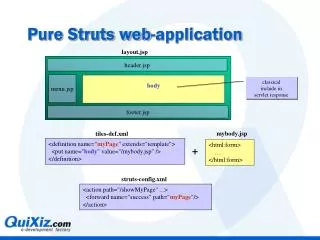
Pure Struts web-application layout.jsp header.jsp menu.jsp body classical include in servlet response footer.jsp mybody.jsp tiles-def.xml <definition name="myPage" extends="template"> <put name="body" value="/mybody.jsp" /> </definition> <html:form> … </html:form> + struts-config.xml <action path="/showMyPage" ...> <forward name="success" path="myPage"/> </action>
Pure Struts web-application • When an action forwards to a Tiles page • The top-level template (layout.jsp) is played and runs the include of the different sections (header, body,..) • Consequences • There is no jsp that is capable of totally displaying the "final" web page - only the (Tiles)RequestProcessor is able to do it • Calling "layout.jsp" will fail • Calling "body.jsp" will partially succeed
Struts-faces web-application layout.jsp header.jsp menu.jsp body <bean:write name="body" filter="false" /> footer.jsp tiles-def.xml myJsfPage.jsp <definition name="myPage" extends="template"> </definition> <tiles:insert name="myPage"> <tiles:put name="body" type="string"> </tiles:put> </tiles:insert> + <f:use_faces> <s:form> … </s:form> </f:use_faces> struts-config.xml <action path="/showMyPage" ...> <forward name="success" path="/faces/myJsfPage.jsp"/> </action>
Struts-faces web-application • Action-forwards refer to physical jsp page • Exactly like a non-Tiles Struts application • No more possible to foward to a logical Tiles page • Consequences • Every jsp should • first insert the desired layout (i.e. the Tiles definition) • then enclose the variable parts (such as its body) as parameters of the specified layout insertion • The jsp’s are now capable of totally rendering the "final" web page • Calling "myJsfPage.jsp" (as JSF is used to do) will succeed