
Uploaded by
aladdin-riggs
2 SLIDES
150 VUES
20LIKES
Purchase Card Approval Process and Notifications
DESCRIPTION
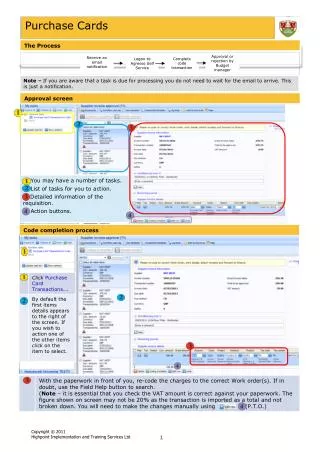
This document outlines the approval and rejection process for purchase cards managed by budget managers. Users will receive email notifications regarding the status of their purchase card transactions. To complete a purchase, log on to Agresso Self Service and follow the necessary transaction codes. This record includes details such as the date and time of transactions, as well as the individuals involved in the process, ensuring a comprehensive audit trail for all purchase card activities.
Download
1 / 2
Télécharger la présentation 
Purchase Card Approval Process and Notifications
An Image/Link below is provided (as is) to download presentation
Download Policy: Content on the Website is provided to you AS IS for your information and personal use and may not be sold / licensed / shared on other websites without getting consent from its author.
Content is provided to you AS IS for your information and personal use only.
Download presentation by click this link.
While downloading, if for some reason you are not able to download a presentation, the publisher may have deleted the file from their server.
During download, if you can't get a presentation, the file might be deleted by the publisher.
E N D
Presentation Transcript
Purchase Cards Approval or rejection by Budget manager Receive an email notification Complete code transaction Logon to Agresso Self Service
Purchase Cards 09/05/2011 12:06 Dan Farmer - Distributed06/07/2011 14:42 Ostle, Martin - Coding Complete






More Related