Yearbook Design Unit: Mastering Layout and InDesign for Effective Journalism
This Yearbook Design Unit, taught by Mrs. Dowd, spans over 6 weeks and focuses on developing students' skills in creating visually appealing newspaper spreads. Students will learn to design layouts in InDesign, understand essential typography, and apply basic design rules to their projects. Key assessments will include the ability to find and utilize magazine design elements, creating original spreads, and effectively managing time and resources. Students will gain hands-on experience with digital photography, as well as critical journalism skills, while fostering teamwork and respect.

Yearbook Design Unit: Mastering Layout and InDesign for Effective Journalism
E N D
Presentation Transcript
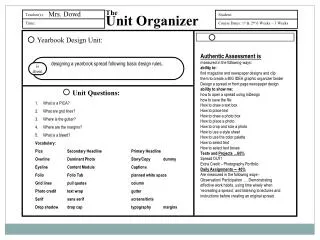
The Unit Organizer Teacher(s): Student: Time: Course Dates: 1st & 2nd 6 Weeks – 3 Weeks Yearbook Design Unit: is about Unit Questions: Mrs. Dowd Authentic Assessment is measured in the following ways: ability to:find magazine and newspaper designs and clip them to create a BIG IDEA graphic organizer binder Design a spread or front page newspaper design ability to show me:how to open a spread using InDesign how to save the file How to draw a text box How to place text How to draw a photo box How to place a photo How to crop and size a photo How to use a style sheet How to use the color palette How to select text How to select text boxes Tests and Projects …60%Spread OUT! Extra Credit – Photography Portfolio Daily Assignments --- 40% Are measured in the following ways– Observation/ Participation … Demonstrating effective work habits, using time wisely when ‘recreating a spread,’ and listening to lectures and instructions before creating an original spread. designing a yearbook spread following basic design rules. What is a PICA? What are grid lines? Where is the gutter? Where are the margins? What is a bleed? Vocabulary: Pica Secondary Headline Primary Headline Overline Dominant Photo Story/Copy dummy Eyeline Content Module Captions Folio Folio Tab planned white space Grid lines pull quotes column Photo credit text wrap gutter Serif sans serif screens/tints Drop shadow drop cap typography margins
Course Map This Course: Student: includes Performance Options Community Principles Learning Rituals Critical Concepts Learned in this Unit Journalism – Newspaper & Yearbook Overtime required of all staff per 6 weeks Photo of the Week Production and Deadlines Beats Tests/Projects/Activities Personal BestRespectful & ResponsibleOnly AppreciationsWork ethicallyLifetime Learner Read the overhead – What are we doing today? Log On & check the website for today’s lesson if working on production. Use Typing Pals and practice for 5 minutes OR read the headlines for the daily news online. National Geographic and TIME are available for reading material as well as a library of MS novels. Sit at the long tables if working on writing activity. Log Off at the end of the period. Students sit at assigned workstations. Spread Study Popular Graphic Ideas Learn to create a spread or front page news page Learn to use InDesign Learn to edit and crop digital photos before placing on spread Planned White Space Dummy Bleed Placeholder Text Dominant Photo Rule Line Typography Gutter Pica Margin