Understanding Smart Clients: Benefits, Drawbacks, and Implementation Strategies
This comprehensive guide by Richard Arthur delves into the concept of Smart Clients, exploring their definition, types, and key advantages. Smart Clients, which encompass both Windows and web applications, offer unique benefits such as smaller footprints, richer user interactions, and centralized data management. However, they also present challenges, including installation complexities and performance issues. The document discusses best practices for implementation, focusing on scenarios that benefit from Smart Client architecture, alongside notable existing applications that exemplify these principles.


Understanding Smart Clients: Benefits, Drawbacks, and Implementation Strategies
E N D
Presentation Transcript
Smart Clients What, Why, and Where By: Richard Arthur
Smart Clients Defined • Best programming benefits of • Windows applications • Web applications • Benefits are • Smaller footprint • Richer interaction • More robust code • Easier deployment • Consistent updates • Centralized data stores
Motivation: Web • Benefits of Web Sites • Easier deployment • Easier upgrades • Ubiquitous access • Centralized data stores • Drawbacks of Web Sites • Managing scale • Less-interactive • HTML – even with JavaScript, it is not great • Stateless • Session management • Limited access to local resources
Motivation: Windows • Benefits of Windows Applications • Richer interactions within the application • Faster performance • Better use of local resources • Can be run when disconnected • Drawbacks of Windows Applications • DLL Hell • Installation and upgrade headaches • Larger installations • “Heavy Footprint” – consumes more resources
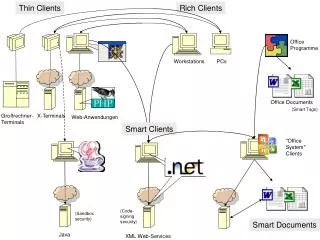
Nifty Graphic http://msdn.microsoft.com/smartclient/understanding/definition/default.aspx
Groups of Smart Clients • Windows • Full-blown stand-alone applications • MS Office • Applications use Office for data management • Mobile • Handhelds use Web Services • store and manipulate data
MS Office? • Source of confusion • Developers got a little trigger-happy with “Smart Client” term • Employs many design principles of Smart Clients • Outlook • works disconnected • Excel • Easy to update deployed spreadsheets • Centralize data and reference it • Use Web Services • Word • Easy to update deployed documents • Centralize the data and reference it • Use Web Services
Existing Applications • Where are smart clients today? • AOL/MSN Messenger • Contact list is centralized • Customizations are stored locally • Seamless application updates • Virus Scanners • McAfee stores local DB of viruses • Regularly updates itself • MS Passport • Centralized storage of Credit Card info • Data shared across web sites
Target Environments • Corporate environments • Lots of users • Central/shared data stores • Frequent or important updates • Know OS/Environments • Home environments • Data duplicated/shared across several machines • Frequent or important updates • Bug fixes • New features
Considerations For Implementing • Consider Smart Clients when your code can/may: • Replicate data across several applications • Data should be centralized for all users • Application needs desktop resources to work • Needs more power than web apps can provide • Application needs connectivity • Can do without it for a while
Facilitating Smart Clients • .NET Framework • Overcoming DLL Hell • Version conflicts • “XCopy” deployment • “No-Touch” deployment • Overcoming large footprint • Many assemblies already exist on client machines • Intermediate code is inherently smaller • Visual Studio .NET 2005 • Overcoming Deployment/Upgrade issues • ClickOnce technology
XCopy Deployment • Old DOS tool for copying several files at once • No registry needed • Some drawbacks • You may need data pre-installed to the registry • You may need data pre-installed outside the install directory • User data should go in the UserAppDataPath directory • No transacted installs • Currently provided by the Windows Installer
No-Touch Deployment • Post to Web/Shared Server • Runs from the download location • Downloads assemblies on demand • Drawbacks: • Unreliable offline functionality • May not have the latest DLLs • DLLs might be cleaned up by IE • Apps can run in “offline” mode only when IE is in offline mode • Same DLL problems as mentioned above
More No-Touch Problems • Runs in “sandbox”-like environment • No access to • Global Assembly Cache (GAC) • Unmanaged code • Registry • Windows Shell • Any Files – except for “Isolated Storage” • Databases • Other Applications • Web Sites other than the originating server
Major Design Considerations • Several areas must be considered • Data • Network • Security • Deployment & Upgrading See: http://msdn.microsoft.com/smartclient/default.aspx?pull=/library/en-us/dnpag/html/scag.asp for greater details
Data Considerations • Central Store • Access from several locations • Share between different users • Local store • No need to share • Store locally for the application • Need to be disconnected • Update regularly: prevent stale data • Update asynchronously: allow interaction while updating
Networking Considerations • When connected • What will you let your users do? • Limit network “chatter” • Make it look fast, ensure completion later • Improves performance (real & perceived) • When disconnected • Use a data store to allow continuous operation • Managing updates when reconnected • Handling dependencies (key-based relationships) • When interrupted • Detecting interruptions to Network service • Recovering from interruptions • Ensuring no data corruption
Security Considerations • Trust No Data! • On the server: • Authenticate and Authorize all requests • Always double-check the data • SSL Encryption is good, but still a stop-gap • Centralize server access • Write consistent code • Write hole-free code • Manage resource permissions properly • On the client: • Validate all the data • Authenticate and Authorize all incoming data • Read “Writing Secure Code” (ISBN:0735617228)
Deployment Considerations • Make sure all clients have the .NET Framework • OneClick • Easier to maintain and upgrade • Not available with .NET Framework 1.1 • No-Touch • Easy to maintain on the server • Harder to maintain on the client • Windows Installation Package • Easy for developer to maintain • Harder to upgrade the application • May combine with OneClick • Download and automatically install periodic updates
Thank You Questions?