
Uploaded by
andie
3 SLIDES
118 VUES
30LIKES
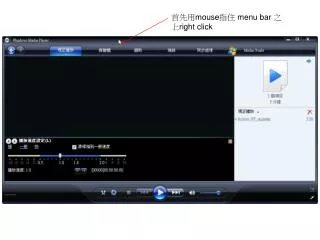
首先用 mouse 指住 menu bar 之上 right click
DESCRIPTION
首先用 mouse 指住 menu bar 之上 right click. 勾選「顯示增強功能」. 按左或右箭咀直至「播放速度」設定這個項目出現. 然後便可拖拉指標調教快慢 (key 音調不會變 ).
Download
1 / 3
Télécharger la présentation 
首先用 mouse 指住 menu bar 之上 right click
An Image/Link below is provided (as is) to download presentation
Download Policy: Content on the Website is provided to you AS IS for your information and personal use and may not be sold / licensed / shared on other websites without getting consent from its author.
Content is provided to you AS IS for your information and personal use only.
Download presentation by click this link.
While downloading, if for some reason you are not able to download a presentation, the publisher may have deleted the file from their server.
During download, if you can't get a presentation, the file might be deleted by the publisher.
E N D













More Related