Schedule Tweets Efficiently with Excel: A Simple Guide
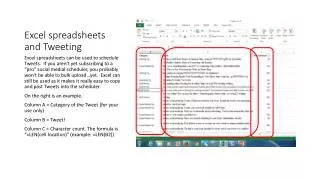
Learn how to effectively use Excel spreadsheets to prepare and schedule your tweets. Even without a professional social media scheduler, you can utilize Excel to organize your tweets, making it easy to copy and paste them directly into your preferred scheduler. This guide includes an example spreadsheet layout: Column A for tweet categories, Column B for the tweet text, and Column C for character counts using the formula “=LEN(cell location)”. Streamline your social media strategy with this practical approach!

Schedule Tweets Efficiently with Excel: A Simple Guide
E N D
Presentation Transcript
Excel spreadsheets and Tweeting Excel spreadsheets can be used to schedule Tweets. If you aren’t yet subscribing to a “pro” social medial scheduler, you probably won’t be able to bulk upload…yet. Excel can still be used as it makes it really easy to copy and past Tweets into the scheduler. On the right is an example. Column A = Category of the Tweet (for your use only) Column B = Tweet! Column C = Character count. The formula is “=LEN(cell location)” (example: =LEN(B2))