Enhance Your Experience with MyStation: Your Ultimate TV Remote and Entertainment Hub
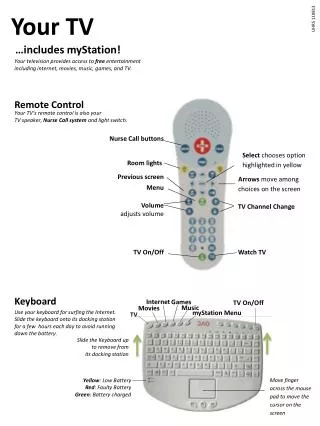
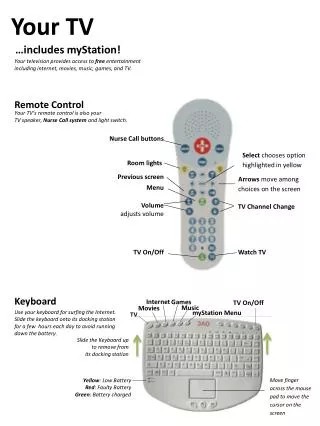
Your TV includes myStation, providing free access to entertainment such as movies, music, games, and TV. The innovative remote control functions as both a speaker system and a Nurse Call device, allowing you to manage room lights, adjust TV volume, and navigate your favorite channels seamlessly. Use the keyboard for Internet surfing and slide it onto the docking station for battery optimization. With the myStation menu, you can easily access health goals, videos, and hospital information, making your TV an essential part of your entertainment and wellness experience.

Enhance Your Experience with MyStation: Your Ultimate TV Remote and Entertainment Hub
E N D
Presentation Transcript
Your TV …includes myStation! Your television provides access to free entertainment including internet, movies, music, games, and TV. Remote Control Your TV’s remote control is also your TV speaker, Nurse Call system and light switch. Nurse Call buttons Select chooses option highlighted in yellow Roomlights Previous screen Arrowsmove among choices on the screen Menu Volumeadjusts volume TV Channel Change TV On/Off Watch TV Keyboard Internet Games TVOn/Off Music Movies myStation Menu Use your keyboard for surfing the Internet. Slide the keyboard onto its docking station for a few hours each day to avoid running down the battery. TV Slide the Keyboard up to remove from its docking station Move finger across the mouse pad to move the cursor on the screen Yellow: Low BatteryRed: Faulty Battery Green: Battery charged
UHR5022213 myStation Menu Your TV’s main screen is the myStation menu.Use the Remote Control or Keyboard to highlight an option in yellow. Press the Select button to choose the highlighted option. (Movies is highlighted here.) Connect to the Internet Play Games Watch Movies Listen to Music Watch TV Your Health Goals View assigned health videos Your assigned HealthVideos Hospital Information Track questionsfor your health team Quick links tothe Internet Your Health Record Channel Lineup