Accessing Your CityU Student Schedule for Semester A 2013/14
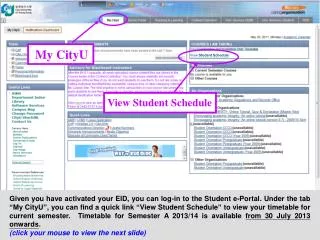
To view your current semester timetable, log in to the Student e-Portal using your activated EID. Navigate to the "My.CityU" tab and select the "View Student Schedule" link. Your timetable for Semester A 2013/14 will be available from July 30, 2013, and classes run from September 2 to November 30, 2013. Please note that classes typically start on the hour and end 10 minutes prior to the next hour. For full class details, click the provided hyperlink. Remember, the Course Reference Number (CRN) is essential for adding or dropping courses.

Accessing Your CityU Student Schedule for Semester A 2013/14
E N D
Presentation Transcript
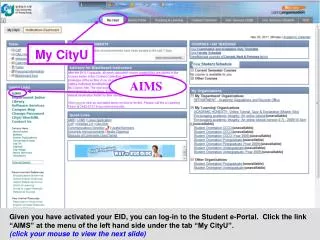
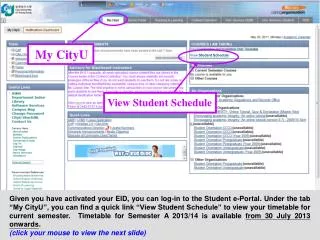
COURSES I AM TAKING My CityU View Student Schedule View Student Schedule Given you have activated your EID, you can log-in to the Student e-Portal. Under the tab “My CityU”, you can find a quick link “View Student Schedule” to view your timetable for current semester. Timetable for Semester A 2013/14 is available from 30 July 2013 onwards. (click your mouse to view the next slide)
Semester A 2013/14 SEP 2, 2013 – NOV 30, 2013 Classes normally start on the hour and finish 10 minutes before the hour. By clicking the hyperlink at the bottom, you will see the full details of the classes. (click your mouse to view the next slide)
Semester A 2013/14 JULY 30, 2013 09: 30 am A 2013/14 SEP 2, 2013 – NOV 30, 2013 A 2013/14 SEP 2, 2013 – NOV 30, 2013 A 2013/14 Here are the full details of the classes. The Course Reference Number (CRN) is a unique identification number of a course section. You will need the CRN when adding/dropping a course section. (to quit the slides, click ‘Back’ of your internet browser )