Comprehensive Hardware Troubleshooting and Diagnostic Techniques
This guide covers essential troubleshooting methods and diagnostic tools for hardware issues. It provides insights on power-on activities, POST diagnostics, and common symptoms of failures. Key elements include using a POST card, visual display error messages, and system isolation techniques. The document also discusses specific diagnostics for components like the keyboard, mouse, and hard drives, along with preventive maintenance schedules. Ideal for technicians, this resource ensures a thorough understanding and effective resolution of hardware problems.

Comprehensive Hardware Troubleshooting and Diagnostic Techniques
E N D
Presentation Transcript
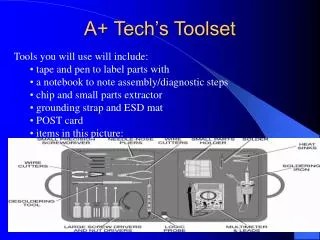
A+ Tech’s Toolset • Tools you will use will include: • tape and pen to label parts with • a notebook to note assembly/diagnostic steps • chip and small parts extractor • grounding strap and ESD mat • POST card • items in this picture:
Initial Troubleshooting • Power-on activities: • Fans • Drive spin-up • Indicator lights • Beep codes • Indicate POST failures, dependant on BIOS manufacturer and programming (p. 239) • Visual Display Error Messages • Basic diagnostics of detected I/O equipment (pp. 238, 243) • Operating System messages (or lack thereof)
Further Troubleshooting • Software Diagnostics • Using built-in BIOS auto-detection and testing routines • Basic configuration/conflict testing • Burn-in Testing • Using a POST card • Hardware Diagnostics • Odors • Burnt wiring or charring • Noises • Reseating of chips, cables, jumpers, etc. • Seating cable in proper positions • FRU Diagnostics • Part swapping or in-place testing of suspected equipment • System isolation
Power Supply Troubleshooting • No lights, drive actions, display, or running fans • One continuous beep • Individual component failure
System Board troubleshooting • Power indicators active, but no drive action or display • Power indicators active, but no display or POST indicators • Lock-ups during normal operation • Continuous memory testing or lockups during memory test • BIOS beep codes • Cannot hold date, time, or configuration settings • CMOS errors, including: • Motherboard/CPU • Gate A20 • DMA Error • Checksum Error • Memory • Memory Mismatch • Checksum Error • CRC Error • Battery • CMOS System Option(s) Not Set • Clock Not Set. • Low Battery • Memory Mismatch
Keyboard Troubleshooting • no response from keyboard, or only some characters work • No changes in num/cap/scroll lock lights • CMOS Errors • KB test failure • Keyboard locked • Interface error • Stuck Key • Wrong characters displayed • Typematic and repeat delay problems • 6 BIOS beeps during POST
Mouse Troubleshooting • Dirty mouse ball or buttons • Incorrect driver setup • DOS • Mouse.com in autoexec.bat • Mouse.sys in config.sys • Windows • Selection of proper driver and settings • Interrupt conflicts on serial ports with modems
Video troubleshooting • No display • Incorrect colors or degaussing failures • Wrong characters displayed • Unwanted control lines • Lack of horizontal or vertical hold • 1 long and 6 short, or 1 long and 2 short BIOS beeps during POST • Setup problems • Safe mode start • DOS start • Color depth, refresh, and resolution incompatibilities • Incorrect drivers
Floppy Drive troubleshooting • Drive Read, Write, and Seek screen errors • On-light lights up without motor action • Motor action without on-light being lit • Same directory listing comes up no matter how many disks are swapped in/out. • No Boot Record found when trying to boot from floppy disk. • Mis-set CMOS configuration or incorrect max size reading when doing a directory listing. • Write-protect tab set
Hard Drive Troubleshooting • No Boot Record found when trying to boot from drive • The PC does not start when turned on • No motor sounds or access lights when power is applied • CMOS HDD Controller failure messages • Out of Disk Space message • Current Drive No Longer Valid message • Incorrect size, sector, landing zone, or head settings during POST.
IDE Master/ Slave/CS confusion SCSI ID/LUN confusion No OS files present Io.sys Msdos.sys Command.com Hard Drive Troubleshooting, cont.
CD Drive Diagnostics • No power lights or drive spin-up • No eject (software or hardware control) • MSCDEX not detecting drives • IDE master/slave/CS confusion • SCSI ID/LUN confusion • Failure to read disks • Interface card confusion • RW issues
Port Troubleshooting • Resource Confusion • Loopback Testing • Modes/Speed/Flow Control incorrectly set • No/inadequate power to external devices • Driver issues
Modem Troubleshooting • Panel light issues • Driver Conflicts • Resource Conflicts • Confusion with mice • Plug and Play • Failure to detect in DOS or CMOS modes • Failure to respond to AT commands (pp. 315-317) • Failure of Dial-Up Networking • Wireline failures • Demarc Failures
Memory Troubleshooting • Incorrect memory counts • Parity errors • Crc errors • Checksum errors • System lockups/blue screens/errors • Module mismatches • Incorrect module paring
Preventive Maintenance Schedule (PMS) Documentation • TASK • Description of task • PROCEDURE • Description of method for completing task • FREQUENCY • Weekly, monthly, quarterly, annually, etc • ACKNOWLEDGEMENT • Who last did the task
Basic PM Tasks • Cleaning • Dust build-ups and static-free removal • Fans and filters • Oxidation removal • Temperature and Humidity Control • Dust • Ventilation paths • Fans • Covers • Adequate power
Monitor PM • Dust Control • Glare Control • Image burn-in prevention • Qualified technicians for in-case work • High voltage anode and capacitors • Yoke protection
Hard Drive PM • No lateral movement unless: • Drive platters are not spinning • Heads are locked in LZ • Never: • Open the dust free vacuum chamber that the platters/heads are in • Low level format an IDE drive unless you are absolutely sure the error table is corrupt • Allow the drive heads to hit the platter • Always have a backup plan • Ensure physical security of the units • Perform regular data maintenance • Defrag • Scandisk • Anti-virus • Other utilities
Floppy PM • Regular head cleaning and alignment • Protection from magnetic fields • Protection from dust, media scratches and heat/sunlight • Regular replacement of both drive and media
System Protection • Power-line protection • Transient spikes • Surge suppression • Clamping speed • Clamping voltage • Sags/brownouts • UPS • VA (wattage) rating • Amp-hour rating • Response time • Laser printer caveats • Remote shutdown systems • ESD Control • Environmental conditions • Grounding and MOS control