
Download
1 / 2
Télécharger la présentation 
ssssssssssssssss
An Image/Link below is provided (as is) to download presentation
Download Policy: Content on the Website is provided to you AS IS for your information and personal use and may not be sold / licensed / shared on other websites without getting consent from its author.
Content is provided to you AS IS for your information and personal use only.
Download presentation by click this link.
While downloading, if for some reason you are not able to download a presentation, the publisher may have deleted the file from their server.
During download, if you can't get a presentation, the file might be deleted by the publisher.
E N D
Presentation Transcript
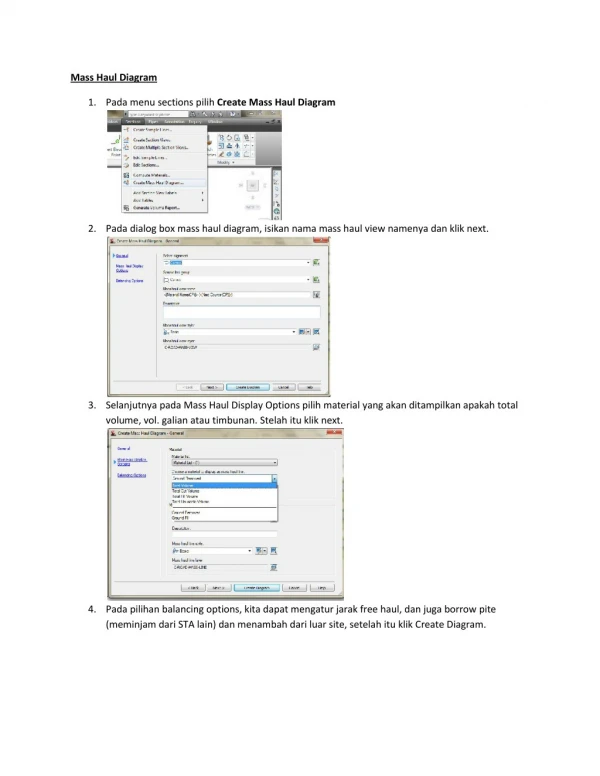
Mass Haul Diagram 1. Pada menu sections pilih Create Mass Haul Diagram 2. Pada dialog box mass haul diagram, isikan nama mass haul view namenya dan klik next. 3. Selanjutnya pada Mass Haul Display Options pilih material yang akan ditampilkan apakah total volume, vol. galian atau timbunan. Stelah itu klik next. 4. Pada pilihan balancing options, kita dapat mengatur jarak free haul, dan juga borrow pite (meminjam dari STA lain) dan menambah dari luar site, setelah itu klik Create Diagram.
More Related