SAP MM - Custmization and Confiuration
Best SAP MM Training Institute in Pune u2013 SAP MM Course<br>best sap mm training institute in pune, We give training, project, placement, smartskills, interview preparation. 100% job assurance.<br>sap mm training institute in pune, sap mm course in pune, sap mm training and placement institute in pune, sap material management training in pune<br>"Visit: www.aspireit.net/ or call us on 9960935600 / 9960935965<br>"<br>

SAP MM - Custmization and Confiuration
E N D
Presentation Transcript
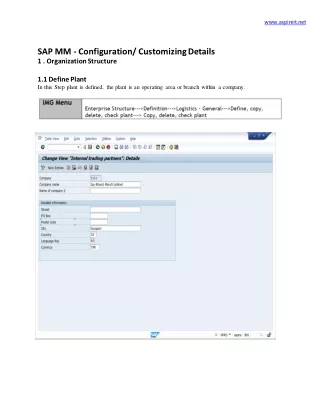
www.aspireit.net SAP MM - Configuration/ Customizing Details 1 . Organization Structure 1.1 Define Plant In this Step plant is defined, the plant is an operating area or branch within a company.
www.aspireit.net 1.2 Maintain Storage Location In this Step storage location is defined, a storage location is the place where stock is physically kept within a plant.
www.aspireit.net 1.3 Maintain Purchase Organization In this step, you set up your purchasing organizations. The purchasing organization is responsible for all purchasing activities. 1.4 Assign Plant to Company Code
www.aspireit.net In this step each plant to a company code. A plant can only belong to one company code. 1.5 Assign Purchase Organization to Company Code
www.aspireit.net In this step, you assign purchasing organizations to company codes. 1.6 Assign Purchase Organization to Plants
www.aspireit.net In this step, you assign purchasing organizations to the plants for which they are responsible. 2 Logistic General This section contains all the information needed to implement the master data of the Materials Management. 2.1 Material Type
www.aspireit.net Whenever you create a material master record, you must assign it to a material type. This requires you to first define the attributes of each material type. You do this in this step.
www.aspireit.net 2.2 Define Number Ranges for Material Master Records
www.aspireit.net In this step, you define the type of number assignment and the number range intervals for material master records per material material type.
www.aspireit.net 2.3 Material Groups
www.aspireit.net In this IMG activity, you define material groups 2.4 Define Account Groups for Vendors
www.aspireit.net In this step, you define account groups for vendors. When creating a vendor master record, you must specify an account group 2.2.5 Define Number Ranges for Vendor Master Records In this step, you define the number intervals of the number ranges for vendor master records
www.aspireit.net 3 Purchasing
www.aspireit.net 3.1 Create Purchasing Groups In this step, you can create purchasing groups. A purchasing group can be an individual or a group of individuals. 3.2 Define Document Types (Purchase Requisition)
www.aspireit.net In this Step you define document type for the purchase requisitions. You can group PRs together to form any number of document types. 3.3 Define Number Ranges for Purchase Requisition
www.aspireit.net In this step, you maintain the number ranges for the following purchasing documents 3.4 Define Document Types (Purchase Order) In this Step you define document type for the purchase Order. You can group POs together to form any number of document types.
www.aspireit.net 2.3.6 Define Number Ranges for Purchase Orders In this step, you maintain the number ranges for the following purchasing documents
www.aspireit.net 3.7 Define Document Types (Scheduling Agreement) In this Step you define document type for the purchase Order. You can group Scheduling Agreements together to form any number of document types.
www.aspireit.net 3.8 Define Number Ranges for Scheduling Agreements In this step, you maintain the number ranges for the following purchasing documents
www.aspireit.net 4 Define Price Determination Process 4.1 Define Condition Type The condition types are used to represent pricing elements such as prices, discounts, surcharges, taxes, or delivery costs in the SAP System. These are stored in the system in condition records
www.aspireit.net 4.2 Define Calculation Schema In the calculation schema (pricing procedure), you specify which condition types are to be taken into account in which sequence.
www.aspireit.net 4.3 Calculation Schema for Local Purchase In this step you specify which condition types are to be taken into account in which sequence for local purchase.
www.aspireit.net 2.4.4 Calculation Schema for Import Purchase In this step you specify which condition types are to be taken into account in which sequence for Import purchase.
www.aspireit.net 4.5 Calculation Schema for Stock Transfer Order In this step you specify which condition types are to be taken into account in which sequence for stock transfer. 4.6 Define Schema Determination In this step you defined the basis for picking the calculation schema of purchase.
www.aspireit.net 2.4.7 Define Schema Determination for Stock Transfer Order In this step you defind the basis for picking the calculation schema for stock transfer order
www.aspireit.net 5 Valuation and Account Assignment 5.1 Group Together Valuation Areas In this step, you assign valuation areas to a valuation grouping code.The valuation grouping code makes it easier to set automatic account determination.
www.aspireit.net 2.5.2 Define Valuation Classes In this step, you define which valuation classes are allowed for a material type
www.aspireit.net Thank You • Click to register for free demo on SAP, Demo Registration • Best SAP Training & Placement Institute in Pune • Online & Classroom training with 100 % Free Placement Assistance • Visit our website www.aspireit.net or call us on 9960935600 • • Our SAP MM live Web Training Programs are based on current present Industry standards. Our SAP MM Trainers having 10+ Years of experienced in SAP Domain & they provide theory and practical in-depth course sessions with interview preparation tips. SAP MM Classroom | online sessions will be conducted on a weekdays and weekend basis with Instructor – LED online SAP MM Training. Trainers are working professionals also helps candidates to get places in MNCs. 24 X 7 Server Access for Practices with Technical Support. Affordable fees structure. • • • •