Download
1 / 13
130 likes | 248 Vues
This comprehensive guide provides a systematic approach to selecting the appropriate material and gas models for various applications including open, closed, and mixing processes. It covers an array of options such as pure gas models, binary mixtures, and multi-flow daemons for different fluids. Users can explore specific models like IG, RG, PG, and their combinations to optimize gas flow simulations. Whether dealing with steady flows or intricate mixtures, this resource is essential for engineers and researchers in the field of gas dynamics.

E N D
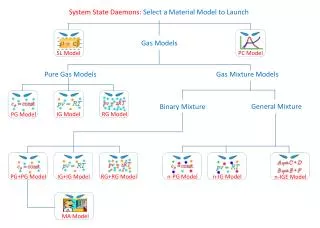
System State Daemons: Select a Material Model to Launch Gas Models PC Model SL Model Pure Gas Models Gas Mixture Models General Mixture Binary Mixture IG Model RG Model PG Model RG+RG Model IG+IG Model PG+PG Model n-IG Model MA Model n-PG Model n-IGE Model
Flow State Daemons: Select a Material Model to Launch Gas Models PC Model SL Model Pure Gas Models Gas Mixture Models General Mixture Binary Mixture IG Model RG Model PG Model RG+RG Model IG+IG Model PG+PG Model n-IG Model MA Model n-PG Model n-IGE Model
Single-Flow Daemons: Select a Material Model to Launch Gas Models PC Model SL Model Pure Gas Models Gas Mixture Models General Mixture Binary Mixture IG Model RG Model PG Model RG+RG Model IG+IG Model PG+PG Model n-IG Model n-PG Model
Gas Models Non-Mixing Multi-Flow Daemons: Select a Material Model to Launch Two Different Fluids Two Identical Fluids PC Model SL Model IG Model RG Model PG Model SL+SL Model PC+PC Model PC+IG Model PC+SL Model SL+IG Model IG+IG Model PG+PG Model RG+RG Model Binary Mixture General Mixture
Gas Models Mixing Multi-Flow Daemons: Select a Material Model to Launch Two Different Fluids Two Identical Fluids PC Model SL Model IG Model RG Model PG Model IG+IG Model PG+PG Model RG+RG Model Binary Mixture General Mixture
Closed Process Daemons: Select a Material Model to Launch Gas Models PC Model SL Model Pure Gas Models Gas Mixture Models General Mixture Binary Mixture IG Model RG Model PG Model RG+RG Model IG+IG Model PG+PG Model n-IG Model n-PG Model
Gas Models Non-Mixing Closed-Process Daemons:Select a Material Model to Launch Two Different Fluids Two Identical Fluids PC Model SL Model IG Model RG Model PG Model SL+SL Model PC+PC Model PC+IG Model PC+SL Model SL+IG Model IG+IG Model PG+PG Model RG+RG Model Binary Mixture General Mixture
Gas Models Mixing Closed-Process Daemons: Select a Material Model to Launch Two Different Fluids Two Identical Fluids PC Model SL Model IG Model RG Model PG Model IG+IG Model PG+PG Model RG+RG Model Binary Mixture General Mixture
Gas Models Semi-Mixing Closed-Process Daemons: Select a Material Model to Launch Two Different Fluids Two Identical Fluids PC Model SL Model IG Model RG Model PG Model IG+IG Model PG+PG Model RG+RG Model Binary Mixture General Mixture
Open Process Daemons: Select a Material Model to Launch Gas Models PC Model Pure Gas Models Gas Mixture Models General Mixture Binary Mixture IG Model RG Model PG Model RG+RG Model IG+IG Model PG+PG Model n-IG Model n-PG Model