
Uploaded by
benedict-cooke
19 SLIDES
346 VUES
190LIKES
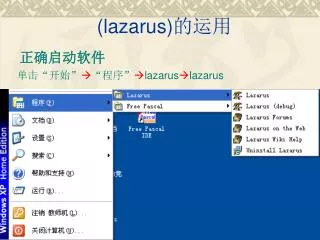
正确启动软件
DESCRIPTION
(lazarus) 的运用. 正确启动软件. 单击“开始” “程序” lazarus lazarus. 需要编写程序前.请关闭以往的源程序!. 1、选择 file. 2 、选择 new…. 3 、选择 project 下的 custom program. 4、选择OK. 4 、删除系统默认生成的源代码. 5 、在空白处添加程序代码. 实例: program Project1; Var a:integer; Begin Assign(input,'123.in'); reset(input); Assign(output,'123.out');
Download
1 / 19
Télécharger la présentation 
正确启动软件
An Image/Link below is provided (as is) to download presentation
Download Policy: Content on the Website is provided to you AS IS for your information and personal use and may not be sold / licensed / shared on other websites without getting consent from its author.
Content is provided to you AS IS for your information and personal use only.
Download presentation by click this link.
While downloading, if for some reason you are not able to download a presentation, the publisher may have deleted the file from their server.
During download, if you can't get a presentation, the file might be deleted by the publisher.
E N D
Presentation Transcript
(lazarus)的运用 正确启动软件 单击“开始”“程序”lazaruslazarus
需要编写程序前.请关闭以往的源程序! 1、选择file
3、选择project下的custom program 4、选择OK
实例: • program Project1; • Var a:integer; • Begin • Assign(input,'123.in'); • reset(input); • Assign(output,'123.out'); • rewrite(output); • Read(a); • a:=a+1; • Write('a=',a); • Close(input); • close(output); • End.
*号说明没有保存 6、程序一定要保存 选择save
8、输入数字 9、选择save
15、打开Open 123.out
17、编程窗口 18、123.in窗口 19、123.out窗口
More Related

Audio
Live Player