Recommended Browsers and Operating Systems for Blackboard Learn 9.1
20 likes | 150 Vues
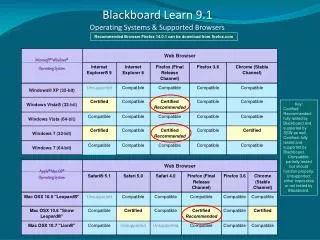
To ensure optimal performance of Blackboard Learn 9.1, use the certified and recommended browsers. Firefox 14.0.1 and the latest versions of Google Chrome are fully tested and supported. Ensure you have the latest version of Sun JRE 6, as JRE 7 is not supported. Avoid using older technologies, including Internet Explorer 6, 7, Firefox 1.x, 2.0, 3.0, Safari 2.0, and Mac OSX 10.4 "Tiger". Compatibility mode may help with issues in IE 8 and 9. Always download the latest versions for the best experience.


Recommended Browsers and Operating Systems for Blackboard Learn 9.1
E N D
Presentation Transcript
Blackboard Learn 9.1 Operating Systems & Supported Browsers Recommended Browser Firefox 14.0.1 can be download from firefox.com Key: Certified Recommended: fully tested by Blackboard and supported by SSW as well. Certified: fully tested and supported by Blackboard. Compatible: partially tested but should function properly. Unsupported: either impossible or not tested by Blackboard.
Blackboard Systems and Browsers: Further Information • Blackboard Learn requires the latest version of Sun JRE 6. The JRE can be downloaded from http://java.sun.com/javase/downloads/index.jsp. JRE 7 is not supported. • You should not try to use the following technologies : • Internet Explorer 6 and Internet Explorer 7 • Firefox 1.x, 2.0, 3.0, and 3.5 • Safari 2.0, 3.x (or any version on Windows) • Mac OSX 10.4 "Tiger" • Java 5 • Internet Explorer 8 and Internet Explorer 9 are tested in Standards Mode. Some known issues can be resolved by using Compatibility Mode (emulates IE7 behavior). • Both Google Chrome and Mozilla Firefox have moved to a rapid release cycle. At the time of testing, Chrome 16.0 and Firefox 9.0 were the latest available versions. Since then, new stable versions have been widely adopted. Blackboard is supporting all newer stable versions of Chrome and Firefox.