Accessing the Allied Telesis Channel Guide Online
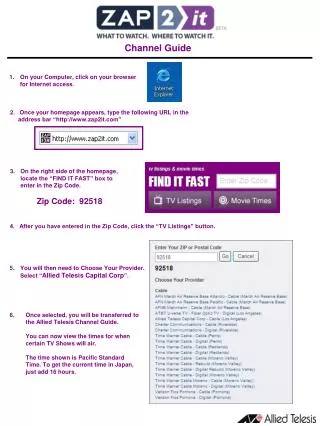
To access the Allied Telesis Channel Guide, start by opening your web browser on your computer and go to "http://www.zap2it.com." Once there, enter the Zip Code 92518 in the "FIND IT FAST" box. After clicking the "TV Listings" button, select "Allied Telesis Capital Corp" as your provider. You will be redirected to the Allied Telesis Channel Guide, where you can view the airtimes for your favorite TV shows. Note that the times are in Pacific Standard Time, so remember to add 16 hours for the current time in Japan.

Accessing the Allied Telesis Channel Guide Online
E N D
Presentation Transcript
Channel Guide 1. On your Computer, click on your browser for Internet access. 2. Once your homepage appears, type the following URL in the address bar “http://www.zap2it.com” 3. On the right side of the homepage, locate the “FIND IT FAST” box to enter in the Zip Code. Zip Code: 92518 4. After you have entered in the Zip Code, click the “TV Listings” button. • You will then need to Choose Your Provider. • Select “Allied Telesis Capital Corp”. • Once selected, you will be transferred to the Allied Telesis Channel Guide. • You can now view the times for when certain TV Shows will air. • The time shown is Pacific Standard Time. To get the current time in Japan, just add 16 hours.