Using `dlmread` for ASCII Delimited Data Import in MATLAB
The `dlmread` function in MATLAB is essential for reading ASCII-delimited numeric data files into matrices. It automatically infers delimiters based on the file's formatting, ensuring organized rows and columns without gaps. Syntax options allow for various configurations, such as specifying delimiters, rows, and columns. With practical examples like analyzing NACA airfoil data and sales figures, `dlmread` simplifies data extraction and processing in aerospace and business contexts. Understand when and how to use `dlmread` effectively for your data analysis needs.

Using `dlmread` for ASCII Delimited Data Import in MATLAB
E N D
Presentation Transcript
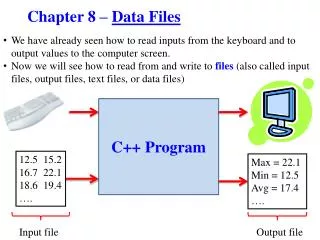
ArraysNumerical Data Files dlmread()
“Unique Delimiter” • “Neatly Organized” • Rows and Columns are “identifiable” • No “holes” anywhere • Always the same patterns per line • There is no mixes of delimiters (commas, spaces, tabs, dash.. )
Documentation of dlmread() dlmread Read ASCII-delimited file of numeric data into matrix. Syntax M = dlmread(filename) M = dlmread(filename, delimiter) M = dlmread(filename, delimiter, R, C) M = dlmread(filename, delimiter, range) Description M = dlmread(filename) reads the ASCII-delimited numeric data file filename, and returns the data in output matrix M. The filename input is a string enclosed in single quotes. dlmread infers the delimiter from the formatting of the file.
Example 1 Airfoils & Plotting
Example Aerospace NACA Airfoils The NACA airfoils are airfoils shapes for aircraft wings developed by the National Advisory Committee for Aeronautics (NACA). (Wikipedia) http://en.wikipedia.org/wiki/NACA_airfoil http://www.ae.illinois.edu/m-selig/ads/coord_database.html#N
Current Project from Tutor Michael Gondek
Example Aerospace NACA Airfoils Once uploaded into arrays, and using slicing to extract the x and y coordinates, it is easy to plot the airfoil in MATLAB.
Example 2 Analyzing Sales
Example Analyzing sales Email from the client: “Please find attached the file. Sum up the last column for each month. Months are in column 2, and will be in the right order. This is a small test file, we’ll email you the big one when we have it. Email us the results. Thanks.”
Example Analyzing sales Sovle by hand: For September: (easy..) $153,440 For October: 135,500 + 147,000 -> $282,500 For December: 154,000+168,000 -> $322,000
Key Points • Vocabulary: delimiters • Recognizing if dlmread() will work with the specific input file. • Using dlmread() with the whitespace delimiter (airfoils) • Using dlmread() with the dash delimiter (sales)