Understanding MATLAB Code for Final Value Calculation
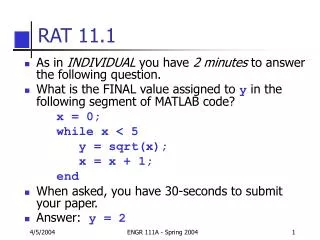
In this MATLAB code snippet, we analyze the loop and execution to determine the final value assigned to variable 'y'. Starting with x initialized to 0, the while loop runs as long as x is less than 5. Inside the loop, 'y' is updated to the square root of 'x', and x increments by 1 each iteration. The loop executes for x = 0 to 4, yielding final values of 'y' as sqrt(4) = 2 when x equals 4. Thus, the final value assigned to 'y' after the loop exits is 2.

Understanding MATLAB Code for Final Value Calculation
E N D
Presentation Transcript
RAT 11.1 • As in INDIVIDUAL you have 2 minutes to answer the following question. • What is the FINAL value assigned to y in the following segment of MATLAB code? x = 0; while x < 5 y = sqrt(x); x = x + 1; end • When asked, you have 30-seconds to submit your paper. • Answer: y = 2 ENGR 111A - Spring 2004