Upgrade MPR Software with PC Programming: Essential Guide for Versions 1.06 and Later
This guide provides detailed steps on how to upgrade the MPR software using PC Programming, specifically for versions 1.06 or later. It outlines the process for activating MPR_SUB and resetting the system. Follow the instructions carefully to ensure a successful upgrade. The steps include selecting "Utility," performing a system reset, and identifying the necessary commands. Ensure that you are using a compatible version of the PC Programming software for seamless integration with MPR software.

Upgrade MPR Software with PC Programming: Essential Guide for Versions 1.06 and Later
E N D
Presentation Transcript
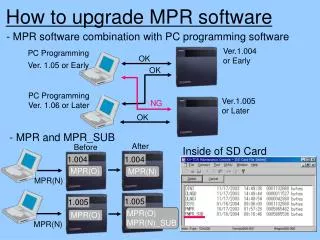
PC Programming Ver. 1.05 or Early Ver.1.004 or Early OK OK PC Programming Ver. 1.06 or Later NG Ver.1.005 or Later OK After Inside of SD Card 1.004 1.004 MPR(N) MPR(O) MPR(N) 1.005 1.005 MPR(O) MPR(N)_SUB MPR(O) MPR(N) How to upgrade MPR software - MPR software combination with PC programming software - MPR and MPR_SUB Before
Please use PC Programming Ver. 1.06 or later 1.005 2- Click How to activate MPR_SUB 1- Select “Utility”-”System Reset”- “Reset by the Command”
6- Click 3- Select 4- Click Before 5- Click The system resets automatically After resetting