UI Design Learnpath
There has been an increasing demand of UI design in the Information Technology field. User Interface (UI) is a place where interactions occur between a human and a computer (machine). The UI design refers to the user interface, which includes visual elements such as images, text, and color that create an easy and accessible environment during interactions. The elements are tangible in UI, which covers the design of interfaces and screens (mobile/ desktop/laptop). In simple words, it is the design of the product's interface.

UI Design Learnpath
E N D
Presentation Transcript
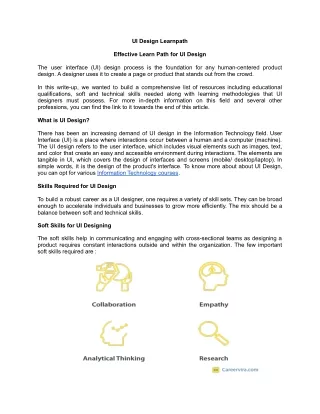
UI Design Learnpath Effective Learn Path for UI Design The user interface (UI) design process is the foundation for any human-centered product design. A designer uses it to create a page or product that stands out from the crowd. In this write-up, we wanted to build a comprehensive list of resources including educational qualifications, soft and technical skills needed along with learning methodologies that UI designers must possess. For more in-depth information on this field and several other professions, you can find the link to it towards the end of this article. What is UI Design? There has been an increasing demand of UI design in the Information Technology field. User Interface (UI) is a place where interactions occur between a human and a computer (machine). The UI design refers to the user interface, which includes visual elements such as images, text, and color that create an easy and accessible environment during interactions. The elements are tangible in UI, which covers the design of interfaces and screens (mobile/ desktop/laptop). In simple words, it is the design of the product's interface. To know more about about UI Design, you can opt for various Information Technology courses. Skills Required for UI Design To build a robust career as a UI designer, one requires a variety of skill sets. They can be broad enough to accelerate individuals and businesses to grow more efficiently. The mix should be a balance between soft and technical skills. Soft Skills for UI Designing The soft skills help in communicating and engaging with cross-sectional teams as designing a product requires constant interactions outside and within the organization. The few important soft skills required are :
● Collaboration: To create an effective product, an individual should accept inputs from clients, partners and designers. They can't have every one of the abilities to promote, code and plan or product information and in this way, need to team up during the planning cycle. This expands their usefulness and proficiency as a colleague. ● Empathy: Empathy is understanding the feelings and issues of others by imagining their perspective. A designer ought to have this expertise to appreciate the issue and needs of the end client and work towards tracking down solutions for their concerns. It is also important not to assume that users will approach problems similarly to designers or developers. ● Analytical Thinking: The UI designers need to continuously analyze, evaluate and apply information to gain insights about the user experience and further help in resolving their issues. The problem-solving process involves analytical thinking as the designer will need to create a web solution for the user after gathering relevant information without an unbiased opinion. ● Research: Research is critical to this career as it deals with user experience, and only with proper research and data study, the professional will understand the needs and preferences of its users. To make informed decisions, it should be backed with factual data; with qualitative and quantitative data analysis, the designers can pinpoint the real issues and further develop solutions for the same, barring any biases Technical Skills for UI Designing When it comes to UI Designer, certain hard skills are pivotal in setting you apart from the rest. You need to know various tools to bring a design to life effectively. We will discuss some of the most essential technical skills required for you to excel in your career. The technical skill is divided into three levels: 1. Beginner 2. Intermediate 3. Expert
1. Beginner ● Coding Coding can be defined as a compilation of programs executed on an electronic device with a set of specific functions. UI designers can focus on learning basic HTML, CSS, and JavaScript only. How to Learn? The skill can be learned through online tutorials on YouTube or other free platforms if you have a background in the programming field. The below mentioned online courses can give you the required knowledge. Complete Coding E-Degree Provider: Eduonix, Price: ₹2,650 ($34.17), Duration: 40 Hours, Level: Beginner ● Visual Design The visual design helps in improving the product’s/ website’s aesthetic appeal via images, texts, shapes and layout to enhance the user’s experience. It is not only about the design or feels, but how the placement of the elements will take place is also taken into account. How to Learn?
Visual design is crucial and can be learned through online platforms at one’s own convenience and time. You can refer to the following courses. Visual and UI Design Foundations: Create Visually Appealing Content Provider: Skillshare, Price: ₹1,252 ($16.14), Duration: 1.02 Hour, Level: Beginner ● Design Tools UI Design tools help create the user interface of a software application. The tools help from designing animations to the button selections on the website that the user interacts with. They help the UI designers to build the design elements faster and easily accessible, making the interface user-friendly. The most used tools in UI design are Sketch, Adobe and Figma. How to Learn? Knowledge of the skill can be gained through YouTube tutorials. Here, we have compiled a list of online courses on UI design and tools for your reference UI Design & Tools Provider : ImaginXP, Price : ₹25,000 ($322.03), Duration : 8 weeks, Level : Intermediate 2. Intermediate ● UI Animations The UI animation is the technique where the UI elements are put into motion to improve the product's appearance and interaction. enhance the intuitive experience. The UI designer will require the skill to make the interface more engaging and entertaining. It could help give a competitive edge if it stands out from the others. It could guide or influence the user and How to Learn? The courses for this skill are available as basic tutorials and online classes on different platforms. You can refer to the below courses for better understanding. After Effects Tutorial: Create Amazing UI Animations Now! Provider: Skillshare, Price: ₹1,252 ($16.14), Price: 1.03 Hours, Duration: Intermediate ● Design Fundamentals The design fundamentals are basic elements on the interface such as buttons, icons, dropdown lists and images that play a considerable role in navigation on the website and understanding the product. The designer creates them in a consistent and simple form but still catches the user's attention. It guides the user to reach their goals effectively and effortlessly. How to Learn? The skill can be learned via online platforms where you will provide excellent insight and practical applications within the course. Below is the list of a few courses we have put together for you. Design Thinking Fundamentals Provider: edX, Price: ₹23,179 ($298.87), Duration: 6 weeks, Level: Intermediate
● A/B Testing A/B testing is an experimental method of comparing two versions of a design element on a website. The main aim is to know which is more effective, successful and easily approachable. The UI designer should adopt this method to enhance conversion rates, revenue, user satisfaction and decision making. As soon as the website is created, the designer should start with the testing process with the users. 3. Expert ● Wireframe: Wireframing is the layout of the information that will exist on the web page. Its focus is on the working process of the interface as compared to the visual aspect or aesthetics. The designer adds or omits and places certain features at particular positions for the sole purpose of wanting the user to process information in the way they plan to. How to Learn? Wireframing tools are available for free, but the skill of Wireframing needs to be learned before using the tools. The online course listed on below platforms will help you for the same. Create website wireframes with Balsamiq Provider: Coursera, Price: ₹754 ($9.72), Duration: 2 Hours, Level: Beginner ● Prototyping: A prototype is a model representation of the product before the result, generally without the coding part. It is part of the design process and represents how the outcome of the product will be. It is used highly for testing the flow of the product and the design’s functionality. How to Learn? To grasp this skill, you will need proper training. Below listed platforms will provide you the necessary knowledge. Design Thinking: Prototyping and User Testing Provider: edX, Price: ₹23,179 ($298.87), Duration: 6 Weeks, Level: Intermediate ● Mobile UI: Mobile UI relates to the user's interaction with the interface's elements via a graphical or touch-sensitive display. It differs from a desktop or laptop in screen size and touch controls. How to learn? The online learning route for this skill will be apt as it will guide you more efficiently. You can refer to the below course to gain the knowledge. UI Design Basics: Design and Prototype Your First Mobile App Provider: Skillshare, Price: ₹1,252 ($16.14), Duration: 1.39 Hour, Level: Beginner
Conclusion: This is a booming field and if you’re wanting to learn more about how to build a successful career in this field and explore various courses available to acquire desired skills and knowledge, then explore our comprehensive learn path and get started with your career. About us Careervira.com is a global edtech market platform. With over 12K+ courses from 65+ global partners across tech and non-tech domains. Careervira.com provides 70+ key decision-making inputs to search and compare from amongst top global courses to zero down on your decision-making by learning partner, skills, course, price, and learn type. We also have a plethora of learnpaths on several different topics; you can view them from our advice page.