
TCO
E N D
Presentation Transcript
TCO Total Cost of Ownership of Technology
Objective of the Presentation • Identify How We Currently Purchase Technology • Define What TCO (Total Cost of Ownership) is. • How to use TCO to Improve the Use of Technology in Our Schools.
Purchasing Technology Currently • Let’s Purchase Today’s Technology with a mid-1990’s Mindset. • Is this how your school/district currently purchases Technology?
Scenario Principal Smith attends a sales pitch on the HP Mini and finds them really cool!!!!
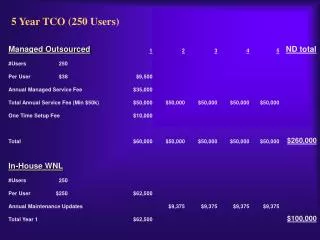
Mini HP Computers • Purchases 24 of them at $480/each = $11,520.00
Cart for the Minis • $1,303.00
Totals • 24 Mini HP Computers = • Netbook Cart = • Sales Tax = • Total =
What is TCO (Total Cost of Ownership)? • Change in Mindset • Borrowed from Business • Reflects all of the costs of purchasing, implementing, and maintaining computers, devices, and related network environments.
Life Cycle of Costs Purchase Support & Maintain Upgrade
Steps to Success • #1 – Vision
Steps to Success • #2 – Improved Student Achievement
Steps to Success • #3 – Adequate Technical Support
Steps to Success • #4 Adequate Professional Development
Steps to Success • #5 Cost of Maintaining and Upgrading
Helpful Resources • Consortium for School Networking Tool • http://www.cosn.org/tco • NEIR-Tec – Northeast and the Island Regional Technology in Education Consortium • http://www.neirtec.org/products/techbriefs/6.htm
Summary • Good TCO = • 1) Less Network downtime • 2) Improved Technology Integration into Curriculum • 3) Teachers/Staff focused on integration instead of Technical Support. • Maximized Technology Investments
Photo Credits • Slide #4 - Excited, by Jeremy Holmes, @ http://www.flickr.com/photos/j3rmz/2648265041/sizes/m/in/photostream/ • Slide #6 - 2008-2009 Laptop Cart and Printer Corner, Ann Oro @ http://www.flickr.com/photos/njtechteacher/2825183505/sizes/l/in/photostream/ • Slide #9 - 20080417_004 (Computer Storage) by Phil Hart @ http://www.flickr.com/photos/radialmonster/2485361952/sizes/l/in/photostream/ • Slide #8 - The Mad Scientist, by lintmachine @ http://www.flickr.com/photos/lintmachine/2878804681/sizes/l/in/photostream/ • Slide #8 - Angry Face, by JillOW’s @ http://www.flickr.com/photos/jow/3025768639/sizes/o/in/photostream/
Photo Credits • Slide #12,#20 - Computer Class, by New Jersey Library Association, @ http://www.flickr.com/photos/njla/3306840279/sizes/l/in/photostream/ • Slide #12 - Network Cables by Ian Britton, @ http://www.FreeFoto.com • Slide #13 - AIUB_Computer_Lab by Farsad http://commons.wikimedia.org/wiki/File:AIUB_Computer_Lab_2.jpg • Slide #14 - Computer Repair by Jason Tromm @ http://www.flickr.com/photos/trommetter/137929210/sizes/o/in/photostream/ • Slide #15,#20 - Computer Training Week #2 by Cambridge Community Television @ http://www.flickr.com/photos/cctvcambridge/2303061064/sizes/l/in/photostream/ • Slide #16 - WEF 07 – Davos (Police Roadblock) by Kecko @ http://www.flickr.com/photos/kecko/371191309/sizes/l/in/photostream/
Photo Credits • Slide #17 - Camera by Jason Dunn @ http://photos.jasondunn.com/ • Slide #18 - Brunel University Graduation 2009 by Brunel University http://www.flickr.com/photos/bruneluniversity/3746378192/sizes/o/in/photostream/ • Slide #19 - Computer Repair Workshop by Dominique Archambault @ http://www.flickr.com/photos/chezdom/3387488151/sizes/l/in/photostream/ • Slide #21 - US Dollar Bills by Ian Britton @ http://www.Freefoto.com • Slide #5 - HP Mini 2140, by Mike Gonzalez, found at Wikipedia Commons • Slide #7 - Cash register keys, by Zen @ http://www.flickr.com/photos/zen/3154132/sizes/z/in/photostream/