
Windows Presentation Foundation (WPF)
E N D
Presentation Transcript
John Korondy Software Development Manager, Core User Interfaces Right Now Technologies John.Korondy@RightNow.com Windows Presentation Foundation (WPF)
Benefits of WPF • Quicker time to market • Reduced cost • Increased life span of product • Reduced cost of maintenance • Ease of branding
WPF at a glance • Consumers • Unified view of all UI • Variety of layout and navigation modes • Deployment options • Infrastructure • Full use of hardware graphics capability • DirectX, vector- rather than pixel-based • Future oriented • Developers • Declarative and event based • Different tools for different roles • Highly customizable
Framework choice • WPF is the future of Windows presentation technology • Other technologies are often still better choices today • ISVs often need to be ahead of the curve • Recommended WPF 3.5 SP1 usage • Web sites that want to push the limits of user experiences • Windows applications with complex data visualization scenarios • New UI applications • Windows Forms – legacy apps and mobile devices • DirectX - platform for intensive graphics (games, CAD applications) • ASP.NET - reach solution for server-based platform-agnostic applications • Silverlight 3 – Rich web based applications
Features • Programming model • Rich: 100s of classes: controls to 3D lights • Containment-friendly • Expressed as declarative or procedural code • Powerful customization capabilities • Built-in support for • Layout • Navigation • Data binding • Animation • Ink • Transformation • Interop • Bi-directional • WinForms, ActiveX, Win32 • Deployment • Push • Pull (ClickOnce) • Browser-based
.NET code - process Instantiate and manipulate all classes Provide procedural event code Reference XAML instantiated classes Strong on sequence XAML - design Instantiate some CLR classes Assign property values Reference other existing (in XAML or code) instances Strong on containment <Button Width="100“ Name=“b1”> OK <Button.Background> LightBlue </Button.Background> </Button> <Button Name=“b1” /> Button b1 = new Button(); b1.Content = "OK"; b1.Background = new SolidColorBrush(Colors.LightBlue); b1.Width = 100; b1.Content = "OK"; b1.Background = new SolidColorBrush(Colors.LightBlue); b1.Width = 100; Dim b1 As New Button b1.Content = "OK" b1.Background = New _ SolidColorBrush(Colors.LightBlue) b1.Width = 100 b1.Content = "OK" b1.Background = New _ SolidColorBrush(Colors.LightBlue) b1.Width = 100 Procedural and declarative
Future WPF Features • DataGrid (!) • Ribbon, Date controls, MaskedTextBox… • Text rendering • East Asian rendering • Video • Quality, Stability, Performance • Deployment • Framework install is too big, takes too long, fails too often • App Cold Start: Too slow • Bitmap Effects
Layout system • Negotiation between parent and children • Coordinates expressed as double • Generally, controls size to content • User can specify: • min/max/actual size • Margins (outside area) • Padding (inside area) • Horizontal/Vertical alignment • The less is fixed, the better (Double.NaN)
Layout controls • Canvas • DockPanel • Grid • UniformGrid • StackPanel • WrapPanel • See though by default (note: no mouse events)
Layout controls specials • Basic customization: override ArrangeOverride and MeasureOverride • Or, custom Panel-derived class • Localization/globalization: • FlowDirection based on user culture prefs • Window sizing may be adjustable to content
Common features • Classes (XAML elements or CLR classes) • Properties • Methods (code only) • Events • Control content patterns • Each control has a Composition Tree • May be modified for customization
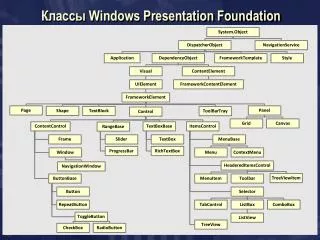
Core classes Object DispatcherObject DependencyObject Freezable Visual ContentElement UIElement FrameworkElement FrameworkContentElement Control
Content models • Content (contains a single item; Button, Border) • Headered content (header and item; GroupBox) • Items (Ordered collection; ListBox) • Headered items (Header and Items; MenuItem) • Decorator (applies effect onto and around controls; ViewBox, Ink)
Content controls • Usage • Single object as content (Content property) • Rendering: • If object is a UIElement – its OnRender method • Otherwise, use DataTemplate if provided • Otherwise, ToString as text • Which controls? • Label • Button • RepeaterButton • RadioButton • CheckBox • Note: use of ‘_’ as keyboard selector
Headeredcontent controls • Controls with: • Header object • Content object • Which controls? • Expander • GroupBox • TabItem
Headered items controls • Controls with: • Header – single object • Items – collection of objects • Which controls? • Toolbar • MenuItem • TreeViewItem
Items controls • Controls with one content property: • Items – collection of objects • Which controls? • Menu • ContextMenu • ComboBox • ListBox • ListView • TabControl • Note: use ItemsPanel to change orientation
Text and ink controls • TextBox, RichTextBox • Optional spellchecker support • Password • Uses SecureString • InkCanvas • Various modes (Ink, Gesture, Select) • Character recognition provided by TabletPC SDK
Decorators • Single Content • Applies effects unto or around the child: • Border • ViewBox • InkPresenter • Adorner Validation Adorner
Adorners • Specialized element linked to a UIElement • Derived from abstract Adorner • References UIElement(s) it adorns • Rendered on top-most AdornerLayer • Receives input (e.g. mouse) events first • Unless IsHitTestVisible = false • May re-direct event to adorned element
Properties • CLR • Dependency • Property of DependencyObject-derived classes • Usually backed by a CLR property • Support run-time computation • Meta defines how change affects rendering engine • Identified by static instance of DependencyProperty • Attached • Specialized Dependency Property • May be used by any type • Usually describes relationship between the two objects • E.g. layout information (Grid.Column, Canvas.Left)
Property setting – direct • As an attribute • As an element (required if value not a simple scalar) <Button Name=“MyButton” Width=“200"/> myButton.Width = 200; <Button> <Button.Background> <HorizontalGradient StartColor="Blue" EndColor="White"/> </Button.Background> </Button>
Property setting – direct (attached) • Attached property • Property of a relationship between two objects • Dock is a property of DockPanel • Used by CheckBox to tell DockPanel where to render it <DockPanel> <CheckBox DockPanel.Dock="Top">Hello</CheckBox> </DockPanel> DockPanel dp = new DockPanel(); CheckBox c = new CheckBox(); c.Content = “Hello”; DockPanel.SetDock(c, Dock.Top); dp.Children.Add(c);
Property setting - databinding • To resource • To a datasource • More about databinding later <Text Foreground="{StaticResource MyBrush}" TextContent="Text" /> <Button Background="{Binding Path=BoundColor}" Width="150" Height="30">I am bound to be RED!</Button>
Property propagation • Dependency properties are evaluated at run-time • Some properties are inheritable • E.g. Background, FlowDirection • Can be overridden by children • Are referenced in code using class’ static property, e.g. TextBox.TextProperty
Events • Types • Life-cycle • E.g. Initialized • User interaction • E.g. Clicked • Databinding • E.g. PropertyChanged • Exposed as • CLR events • Virtual functions
Events • Use CLR event-delegate model • Delegate may be assigned in XAML or code <Button Click="b1SetColor">button</Button> void b1SetColor(object sender, RoutedEventArgs args) { //logic to handle the Click event void MakeButton2() { Button b2 = new Button(); b2.Click += new RoutedEventHandler(Onb2Click2); } void Onb2Click2(object sender, RoutedEventArgs e) {
Event propagation • Bubbled: handled by parent object • E.g. MouseDown • Tunneled: handled by a child object • E.g. PreviewMouseDown • Direct • E.g. [Preview]MouseLeftButtonDown • Use event’s Handled property to stop further processing
Commands • UI – implementation indirection • Many UI elements can access same implementation • E.g. button, menu, keyboard, etc. • Context-based implementation • E.g. clipboard commands for text and image • With data binding allows presenters to be view-neutral
Command pattern Execution logic ICommand e.g. RoutedUICommand UI element Execute CanExecute Execution logic
Implementing commands • Derive from ICommand or use RoutedUICommand • Execute • CanExecute • CanExecuteChanged • Built-in commands • ApplicationCommands – Close, Copy, Cut, … • ComponentCommands – MoveDown, PageUp, … • MediaCommands – Play, Stop, … • NavigationCommands – Back, Forward, …
Text Handling • Text rendering • ClearType sub-pixel • Smooth text animation by char or glyph • Typography • OpenType fonts with TrueType glyph definitions • Resolution independent layout and rendering • International text • Enhanced fonts • Unicode • Beyond italic and bold • Text APIs • Layout and user interface • Lightweight drawings with text • Advanced text formatting Culture: en_US Culture: ar_SA
Customization A Slider • Customizing properties • E.g. ArrangeOverride • Overriding behaviors • Specifying control styles • Modifying control templates • Sub-classing or aggregating existing controls A ListBox
Workflow overview Architecture: identify components Generate empty classes Define functional UI Complete Presenters Provide visual enhancements Develop code-behind
Main components • Application • UI layout containers • Work items • UI elements • Views (XAML) – display and data binding • Code behind – hides UI concepts from presenter • Presenters – marshals between views and business semantics • WPF Resources • Data services
Roles • Architect • Creates solutions, projects, classes • Defines ‘connection points’: properties and events • Designer • Defines Views (presentation objects) • Container layouts • Controls • Defines the ViewModel (bindablebusiness objects) • Defines the Model (data layer abstraction) • Defines common styles, templates (different skill set!) • Programmer • Implements code behind, presentation classes and business object classes
Roles and tools • Architect - VS.NET Class designer • Designer – Expression Blend • Developer - VS.NET code editor
Limitations/usage notes - Blend • Avoid opening XAML files in VS - that way there is less chance of changing something that you may also change in Blend • If you do open them, use XAML Editor (not Designer) • Set as few properties on individual controls as possible – leave it to styling • Particularly, reset sizes, margins, etc. to Auto • Use VS to edit XAML(IntelliSense)
Blend limitations • DataTemplate - needs to be created in VS • Unable to style TreeViewItem • Unable to style invisible items, e.g. TreeViewItem • Bug in Blend: DisplayMemberBinding for GridView requires manual expression entry • Multi-part namespaces not handled • When using project dependency in VS, include ALL dependent projects (otherwise VS compiles OK, Blend does not)
Assembly Application Manifest WPF Application Components Development Project XAML Configuration Build Code-behind Settings
Lifecycle components Build Deploy Develop XAML BAML .exe .config .manifest Glue (partial class) Code behind Code behind (partial class)
XAML basics • XML serialization format • XamlReader and XamlWriter (partial serializer) Define namespaces <Window x:Class="Dialogs.Window1" xmlns="http://schemas.microsoft.com/winfx/2006/xaml/presentation" xmlns:x=“http://schemas.microsoft.com/winfx/2006/xaml” xmlns:myCtrl=“clr-namespace:XYZ.MyCtrls;assembly=MyCtrls” Title="Main Window" Height="545" Width="580" > <Grid> <Grid.ColumnDefinitions> <ColumnDefinition Width="0.318181818181818*" /> <ColumnDefinition Width="0.681818181818182*" /> </Grid.ColumnDefinitions> <myCtrl:SomCtrl Width=“20” … Instantiate class of type … Set simple property value Set complex property value Create object from non-default namespace
XAML basics: x:Name extension • Name applies to objects with Name property • Also translates as CLR object instance name • x:Name can be used for all objects • Blend always generates as x:Name
Deployment • Windows installer • Full trust • Full control • As application • As control • Through WPF/WinForm/Win32 interop • Through 3.5 AddIn • Web deployment • Partial trust – governed by CAS • Isolated code and storage • Partially connected (ClickOnce technology) • Added to Start Programs • Includes version update policy • Add/Remove or Revert to previous version support • Browser (always online) • Standalone (Xbap) • IE or Firefox (IETab, V3.5 only) • Navigation integrated with browser navigation • As control using 3.5 AddIn support • As XAML fragment (Frame)
Execution • Logical, visual and composition trees • Rendering based on capabilities • ‘Hardware’ or ‘software’ • Can be detected using RenderCapability • Controls entire visual airspace
VS.NET Application types • Windows application • Own Window • Modal and modeless dialogs • Browser based application (Xbap) • Hosted in browser • Built-in navigation support • User control library • Custom control library • Add-in (3.5 only)
Common application features • Application object • Accessible through Application.Current • Starts or identifies (StartupUri) initial window • Provides startup/shutdown events • Contains the Main method • Starts message pump - single threaded apartment • Contains a resource bag or add properties to App • Multithreading • Use Dispatcher property to marshal across threads • Invoke supports thread priorities • New UI threads possible
Creating secondary windows • Modeless, does not close when main window closes • Modeless, closes with main window • Modal Window2 win = new Window2(); win.Show(); Window2 win = new Window2(); win.Owner = this; win.Show(); Window2 win = new Window2(); win.ShowDialog();
Browser-based apps • Demo – create XBAP in VS.NET • Deployed as ClickOnce always-online • Require .NET Framework V3 installed • Execute in browser • Navigation integrated with browser • In 3.5 also supported in Firefox (with IETab)
Resources • Compiled as objects into logical tree • Brush definitions • Style definitions • Loaded from data • Media files (jpg, gif) • Resource dictionaries