Understanding Simple Data Types and Operators in C Programming
This chapter focuses on the fundamental aspects of simple data types and variable declarations in C programming. It explores how to declare variables, the various simple data types available, and the use of expressions and operators, along with their priority levels. Additionally, it covers the formatting of output using `printf` and handling keyboard input with `scanf`. By the end of this chapter, you will gain a solid foundation to design simple programs and effectively work with data types in C.

Understanding Simple Data Types and Operators in C Programming
E N D
Presentation Transcript
Chapter 2 Simple Data Types By C. Shing ITEC Dept Radford University
Objectives • Understand How to declare a variable • Describe C simple data types • Understand C expressions, operators and their priority level • Understand how to use format output (printf) • Understand how to use keyboard input: scanf • Understand how to design a small pogram
Variable Declaration • Declaration form: • Type identifier [= initial value]; Note: In ANSC C, you must declare all variables before using statements Identifier: • begins with a letter or underscore • Begins with underscore: for system • Begins with letter: for user • The rest either letter, digit or underscore • Up to 255 characters
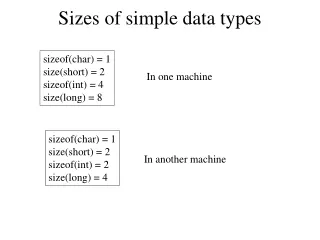
Types • Simple data type • Modifier: (signed, unsigned), (long, short) except on char • char, int (default), float, double • Sizes are system dependent • int (16 or 32 bots), float (32 or 64 bits) • Use sizeof (type) operator to find the data type size • sizeof (char)=1<=sizeof (short)<=sizeof (int)<=sizeof (long) • sizeof (signed)=sizeof (unsigned)=sizeof (int) • sizeof (float) <= sizeof (double)<=sizeof (long double) • Structured data type • char[] (array, string), type * (pointer) • struct (record)
Initial Values • char: ‘A’, ‘\a’ (or ‘\7’,’\07’,’\007’ alert), ‘\\’, ‘\b’ (backspace), ‘\r’ (carriage return), ’\”’, ‘\f’ (form feed), ‘\t’, ‘\n’, ‘\0’ (null), ‘\’’, ‘\v’ (vertical tab), ‘\?’ • all characters are stored as ASCII integers • No constants of character type in C (However, yes in C++) • int: with or without sign • Decimal: -3 • Octal: 023 • Hexadecimal: 0x123
Initial Values (Cont.) • long: 1234567L • float: 0.123F • double: • Any number with decimal point is treated as double, e.g. 0.123 • Number in scientific notation, e.g. -123.45e-1
Expression • Combination of variables, constants and operators Example: x-1 > 5 is an expression
Operators • Increment and decrement: Prefix and postfix • ++, -- • Arithmetic • *, /, %, +, - • Relational • ==, !=, >, <, >=, <= (no space in between) • Logic • ! (not), && (and), || (or) • Conditional • Expr1 ? expr2 : expr3 • Comma (used in variable declaration)
Operators – Increment and Decrement • ++ variable/ -- variable • Increment(or decrement) variable by 1 before evaluating the current statement • variable ++/ variable – • Increment(or decrement) variable by 1 after evaluating the current statement
Operators - Arithmetic • / : quotient of 2 integers division Example: 5/9=0 9/5=1 Note: in order to get the desired result of 5/9, Use either one below: 5.0/9, 5/9.0. 5.0/9.0
Operators – Arithmetic (Cont.) • %: remainder of 2 integers division If negative integer is in exactly one of numerator or denominator, then do division as in all positive Numbers and just add a negative sign in front of the result. For example: (-40)/11=- (40/11)=-3 Note: Do not use negative numbers in % since it is implementation dependent.
Operators - Relational • Do not compare float or double number using == or != Example: double x=5.0; if (x == 5.0) { printf (“x=5.0\n”); // this line may not be //printed due to round off error }
Operators - Logic Example: int x=2; printf (“%d\n”, 1<x<3); // 1 is printed
Example • Given a=2, b=-3, c=5, d=-7, e=11 (1) a/b/c= (2) 7+c* -- d/e = (3) 2* a%-b+c+1= (4) 7+ ++a%4=
Example • Given a=2, b=-3, c=5, d=-7, e=11 (1) a/b/c=(2/-3/5)=(-(2/3))/5=(-0)/5=-(0/5) =-0=0 (2) 7+c* -- d/e = 7+5*(-8)/11=7+(-40)/11 =7+(-(40/11))=7+(-3)=4 (3) 2* a%-b+c+1=2*2%3+5+1=4%3+5+1 =1+5+1=7 (4) 7+ ++a%4=7+3%4=7+3=10
Operators Exercises: Given int a=1,b=2,c=3,d=4; Find the values of the following table: Expression Value ________ _____ a*b/c a*b%c+1 ++a*b-c 7 - - b * ++ d a/b/c a/b % c 'A'+1 ('A'+1) < b a>b && c<d a< ! b || ! ! ‘A’ a + b < !c + c a - d || b*c && b/a
Operators Exercises: Answer Given int a=1,b=2,c=3,d=4; Find the values of the following table: Expression Value ________ _____ a*b/c 0 a*b%c+1 3 ++a*b-c 1 7 - - b * ++ d 17 a/b/c 0 a/b % c 0 'A'+1 66 ('A'+1) < b 0 a>b && c<d 0 a< ! b || ! ! ‘A’ 1 a + b < !c + c 0 a - d || b*c && b/a 1
Format Output - printf • Form: • printf(“%modifier format_code characters”, variables); Example: printf(“%6d\t%d\n”,number1, number2);
Format Output – printf (Cont.) • Modifier: printf(“%modifier format_code characters”, variables); • -: left justified • +: display + for positive, - for negative value • 0m: padded with leading 0s when less than m digits printed • n(integer): min number of spaces
Format Output – printf (Cont.) • Modifier : (Cont.) • p.q:min: • %f, %e, %E: • min total p spaces, q digits after decimal point • %g, %G: • min total p spaces, q significant digits • %s: • At least p total spaces, at most q spaces of the string • %d: • At least p spaces, min q digits displayed; padded with 0 if not enough digits • #: hexadecimal with 0x prefix • *.*: specify min spaces and # of digits after decimal point
Format Output – printf (Cont.) • Examples: • printf (“%s\n”, “How are you?”); • printf (“Beep me!%c\n”,’\a’); • printf (“A right-justified number: %6d”, 5); • printf (“A left-justified number: %-6d”, 5); • printf (“%6.2f\n”, 12.3F); • printf (“%*.*f\n”, 6, 2, 12.3F); • printf (“%6.2lf\n”, 1.236); • printf (“%#x\n”, 123); • printf(“%2.6d\n”, 123); • printf(“%2.4s\n”, “Morning”);
Format Output – printf (Cont.) • Examples: • printf (“%s\n”, “How are you?”); // How are you? Is printed • printf (“Beep me!%c\n”,’\a’); • printf (“A right-justified number: %6d”, 5); // 5 is printed • printf (“A left-justified number: %-6d”, 5); // 5 is printed • printf (“%6.2f\n”, 12.3F); // 12.30 is printed • printf (“%*.*f\n”, 6, 2, 12.3F); // similar to above • printf (“%6.2lf\n”, 1.236); // 1.24 is printed • printf (“%#x\n”, 123); // 0x7b is printed • printf(“%2.6d\n”, 123); //000123 is printed • printf(“%2.4s\n”, “Morning”); //Morn is printed
Format Output – printf (Cont.) • Examples: Hello World Example
Format Output – printf (Cont.) • Practice: Given int i=123; double x=0.123456789; Show what to be printed? statement print out ________ _______ printf("%d",i) printf("%05d",i) printf("%7o",i) printf("%-9X",i) printf("%-#9x",i) printf("%10.5f",x) printf("%-12.5e",x)
Format Output – printf (Answer) • Practice: Given int i=123; double x=0.123456789; Show what to be printed? statement print out ________ _______ printf("%d",i) 123 printf("%05d",i) 00123 printf("%7o",i) 0173 printf("%-9X",i) 0X7B printf("%-#9x",i) 0x7b printf("%10.5f",x) 0.12346 printf("%-12.5e",x) 1.23457e-01
Keyboard Input Format Function - scanf • Form: scanf(“format”, variable_address); • Format: similar to those used in printf Example: char c; int i; double db; scanf(“%c%d%lf”, &c, &i, &db); // sample data:a 100 -1.23 This is a sample data // c=‘a’, i=100, db=-1.23
Small Program Design • Comment: describe assumption, given input data, and output result. Write the algorithm how to achieve the output using the input • Define variables (use meaningful names and data types) that used to store input, output and intermediate results
Small Program Design (Cont.) • Input data: either store initial values in variables, get data from files or use keyboard input • Process data: use expression to calculate Results and store them in variables • Output result: display results in screen or store them in files
Small Program Design (Cont.) Example: /* Program Purpose: assumption: input: output: algorithm: Programmer’s Name: */
Small Program Design (Cont.) Example: (Cont.) int main(void) { double celsius, fahrenheit=…; // input celsius= …; // process printf (“…..”); // output return 0; }
Small Program Design (Cont.) • Example: Yard-Meter Conversion
Class Example • Example 1 • Example 2 • Example 3 • Example 4
Class Example (Cont.) • Use scanf function to read data from keyboard: Example 1 • Use redirect input (<) /output (>) from/to file: a.out < inputdata.txt > output.txt inputdata.txt output.txt • Use “for loop”: Example 1 • Interchange DOS and Unix format: dos2unix, unix2dos dos2unix dosformatfile.c unixformatfile.c
References • Herbert Schildt: C: The Complete Reference, 4th ed, Osborne Publishing • Deitel & Deitel: C How to Program, 4th ed., Chapter 2 & 9, Prentice Hall