
Maximizing WAN Network Performance: Factors, Parameters, and Optimization Techniques
E N D
Presentation Transcript
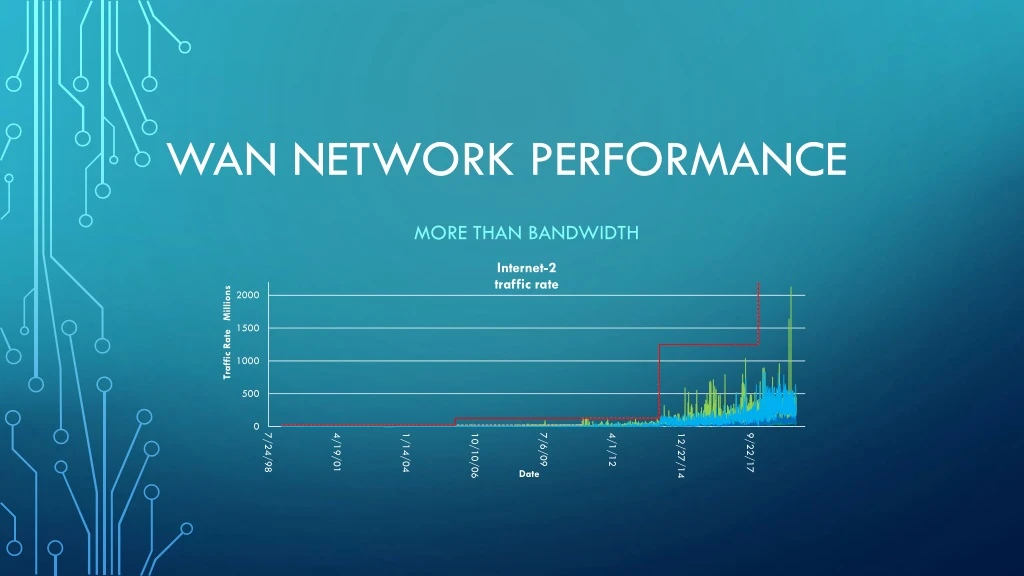
WAN Network Performance More than Bandwidth
Optimizing WIDE Area Transfer • Network Factors • Parameters of network impacting transfer rates • Node Factors • Machine configurations impacting transfer rates • Measurement and Test • Using perfsonar nodes to examine performance across the network
Network Parameters Bandwidth, Delay and Loss Main factors effect network stream performance (single TCP connection) • Bandwidth – available “data speed” of connection • Connectivity – link speeds throughout the path 1 Gbps, 10 Gbps, 40 Gbps, 100 Gbps • Delay – Round Trip Time (RTT) • Delay between sending and receiving – speed of light • Store and Forward “Hops” • Loss – packet loss • Path Bandwidth – Various link speeds in path • Network Congestion – traffic contending for the same link(s)
Path Bandwidth Path bandwidth – available speeds end-to-end System Network attachment Campus Network Wide-Area Network(s) Cornell campus and WAN Local connection speeds Building Connection – To Building: 10G, building internals: 1/10G, CAC: 100G Backbone Connection - 2019: 100G (x2) to Rhodes, 10G (x2) to other nodes 100G Cornell to NYSERNet 100G NYSERNet and Internet2 backbones 1/10/100G Internet2 to participating institutions Mushy Details – may vary over time Multi-path routes - multiple paths across an area Network equipment internals – backplane forwarding; flow processing in firewalls; buffer overflows Contending traffic – other traffic along the paths
Packet Loss – a network property Internet is design to be • Packeted – traffic is broken in to packets (1500 or 9000 Bytes) • Lossy – data can be lost, resulting in lost packets • Link(s) capacity • Traffic contending for output on a link • Traffic “over spilling” buffers – in/out on network devices • Loss is recovered within TCP protocol – signaling protocol to retransmit lost data • In-the-kernel – Applications are unaware of details, only the throughput • ‘netstat -s’ reports box-level retransmits, but per-connection is not generally available.
TCP Packet Loss TCP: Loss-less protocol for lossy networks Lost packets – nominal method of detecting that you’ve exceeded the “network” Retransmission – TCP Congestion Windows (CWND), Selective Acknowledgement (SACK) Congestion Avoidance – “Slow Start” pacing upon packet loss. Congestion avoidance –https://en.wikipedia.org/wiki/TCP_congestion_control Equipment Buffers – can help / can hurt
TCP actions Interval Throughput Retransmits Current Window 0.0 - 1.0 7.19 Mbps 1 40.54 KBytes 1.0 - 2.0 17.62 Mbps 0 94.12 KBytes 2.0 - 3.0 45.87 Mbps 0 238.92 KBytes 3.0 - 4.0 91.23 Mbps 0 457.57 KBytes 4.0 - 5.0 166.83 Mbps 0 847.08 KBytes 5.0 - 6.0 251.66 Mbps 1 1.04 MBytes 6.0 - 7.0 304.09 Mbps 0 1.46 MBytes 7.0 - 8.0 482.35 Mbps 0 2.21 MBytes 8.0 - 9.0 702.55 Mbps 0 3.14 MBytes 9.0 - 10.0 964.69 Mbps 1 2.14 MBytes 10.0 - 11.0 555.74 Mbps 0 2.18 MBytes 11.0 - 12.0 555.74 Mbps 0 2.25 MBytes 12.0 - 13.0 356.51 Mbps 1 1.17 MBytes 13.0 - 14.0 304.09 Mbps 0 1.22 MBytes 14.0 - 15.0 314.57 Mbps 0 1.37 MBytes 15.0 - 16.0 377.49 Mbps 0 1.66 MBytes 16.0 - 17.0 314.57 Mbps 1 926.72 KBytes 17.0 - 18.0 146.80 Mbps 1 501.01 KBytes 18.0 - 19.0 125.83 Mbps 0 548.79 KBytes 19.0 - 20.0 157.29 Mbps 0 693.59 KBytes Summary Interval Throughput Retransmits 0.0 - 20.0 312.13 Mbps 6 Sample iperf3 stream to: perfsonar1.ccast.ndsu.edu The RRT is: 31 msec The Node Connectivity: 10G
Latency - A network property Bandwidth*delay product Tuning Improvements Delay is the time between sending and receiving often express as Round Trip Time (RTT) TCP Windows – Computed during setup. How much to keep sending while awaiting acknowledgement for what has been sent already. Congestion Window (cwnd) used recover lost packets Long RRT and high bandwidth – these increase the amount of “unacknowledged” packets/bytes. TCP window scaling – RFC1323 TCP windows can be bigger than 16-bit value Check support for RFC1323 Selective Acknowledgement (SACK) Host can re-transmit a single lost packet, or a whole TCP window. Check Support RFC2018 Host tuning can improve stream performance Many hosts tuned for 100M-1G Increase network buffers - https://fasterdata.es.net/ Kernel TCP queue and CA algoshttp://man7.org/linux/man-pages/man8/tc.8.html Kernel testing, simulation https://wiki.linuxfoundation.org/networking/netem
Packet Loss and Latency campus Sydney AU 221 msec metro FERMI Lab 35 msec NYC 8 msec Stanford 73 msec Cern.ch 91 msec AWS east 16 msec
Host Transfer Performance • Distance/Latency • If local transfer: high transfer rates with no special consideration • If Wide-Area transfer: host tuning to improve stream performance • Host bus and disk performance • PCIe host bus improvement: PCIeV3 has +10G channels • Memory speed: 64-bit, SSD RAM • Disk speed: NVMe, SATA, RPMs • https://en.wikipedia.org/wiki/PCI_Express • Protocols • Single-stream transfers: scp, sftp • TCP vs UDP • Multistream: gridFTP, Globus, Apsera, bbcp
Storage Speeds Performance of Storage Technologies Traditional 7200 RPM HDD: 160 MB/s SATA III SSD: 600 MB/s NVME M.2 SSD: 3500 MB/s
Host Configurations Latency Hardware Protocol Increase host network buffers Window Scaling support (RFC1323) SACK support (RFC2018) Congestion Avoidance algorithm https://fasterdata.es.net/ 10/40/100G Ethernet PCIe buss speeds Memory performance Disk speed, disk attachment, I/O https://en.wikipedia.org/wiki/PCI_Express https://fasterdata.es.net/science-dmz/DTN/hardware-selection/ Transports TCP vs UDP Single-stream vs multi-stream Applications and Tools GridFTP, Globus, Aspera Scp/sftp, bbcp http://moo.nac.uci.edu/~hjm/HOWTO_move_data.html
perfsonar So data transfers are slow… Wouldn’t it be nice to test the network with machine(s) along the network path to benchmark the path, latency, and peak transfer-rates Solution: Perfsonar nodes • Publicly accessible resource placed in campuses, labs, research sites around the world • Owamp ping to measure latency • traceroutes/tracepath to identify path from remote location • iperf3, iperf2, nuttcpdata-rate transfers tests between other perfsonar nodes • Mechanisms to execute tests from other, remote perfsonar nodes • Ad-hoc and schedulable test execution
Cornell Campus Perfsonar TESTERs Two 10GE testers Border, located adjacent to 100GE WAN router: http://ps-wan-10g.net.cornell.edu/ CAC, located adjacent to CAC/Rhodes 100GE router: http://ps-rhodes-10g.net.cornell.edu/
Perfsonar Ad-hocinvestigate path characteristics Latency to Sites Throughput to Sites
Perfsonar pschedulerrun tests routinely to observer over timeRUN TEST BETWEEN ANY Two PERFSONAR NODES
[ps-rhodes-10g ~]$ pscheduler task throughput --dest perfsonar1.ccast.ndsu.edu --source perf-master.nysernet.org Submitting task... Task URL: https://perf-master.nysernet.org/pscheduler/tasks/b0f9ce1f-4bf8-4bed-8d5a-1595bdd4b3b6 Running with tool 'iperf3' Fetching first run... Next scheduled run: https://perf-master.nysernet.org/pscheduler/tasks/b0f9ce1f-4bf8-4bed-8d5a-1595bdd4b3b6/runs/6431eead-d5eb-442b-b685-c1f76c8a26c1 Starts 2019-07-25T14:19:13Z (~51 seconds) Ends 2019-07-25T14:19:32Z (~18 seconds) Waiting for result... * Stream ID 5 Interval Throughput Retransmits Current Window 0.0 - 1.0 5.91 Mbps 1 36.20 KBytes 1.0 - 2.0 18.21 Mbps 0 88.33 KBytes 2.0 - 3.0 43.27 Mbps 0 228.78 KBytes 3.0 - 4.0 94.36 Mbps 0 453.22 KBytes 4.0 - 5.0 176.14 Mbps 0 832.60 KBytes 5.0 - 6.0 283.12 Mbps 0 1.25 MBytes 6.0 - 7.0 429.93 Mbps 0 1.88 MBytes 7.0 - 8.0 304.08 Mbps 2 1.02 MBytes 8.0 - 9.0 272.60 Mbps 0 1.08 MBytes 9.0 - 10.0 304.13 Mbps 0 1.25 MBytes Summary Interval Throughput Retransmits 0.0 - 10.0 193.17 Mbps 3 No further runs scheduled. Between ANY NODEs Example of throughput test Source: perf-master.nysernet.org Destination: perfsonar1.ccast.ndsu.edu
Test from you machine to Perfsonarsee On-Demand Testing tools Tracepath to wah-pt1.es.net Ping, traceroutes, tracepath