Efficient Data Management and Archiving with HSMd and ADML Integration
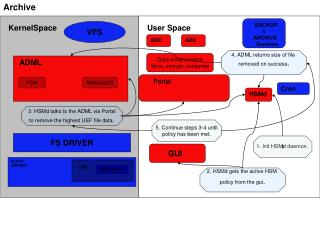
This document explains the procedures for managing data archiving and enhancement using the HSMd daemon and the ADML Portal. It covers the removal of highest UEF file data, ensuring that operations continue until the designated policies are met. It highlights key functionalities, such as file size retrieval upon successful removal and integration with LVM snapshots for efficient data organization. Users will learn to initialize the HSMd daemon and how to interact through the GUI to retrieve active policies for streamlined data management.

Efficient Data Management and Archiving with HSMd and ADML Integration
E N D
Presentation Transcript
Archive BACKUP & ARCHIVE Services KernelSpace VFS User Space ADC ADC 4. ADML returns size of file removed on success. Data enhancement Virus, encrypt, compress ADML Portal PDM MANAGER Cron HSMd 3. HSMd talks to the ADML via Portal to remove the highest UEF file data. 5. Continue steps 3-4 until policy has been met. FS DRIVER 1 1. Init HSMd daemon. GUI BLOCK DRIVERS LVM SNAPSHOT 2. HSMd gets the acitve HSM policy from the gui.