Mouse Solutions… listen to your body!
10 likes | 139 Vues
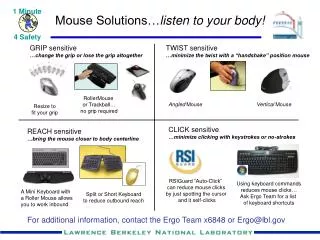
Discover effective ergonomic solutions to enhance your workspace and reduce strain. Our range of mouse options, including the RollerMouse and Trackball, minimizes grip and twisting actions, allowing for a more natural hand position. Use the Angled and Vertical mice to fit your grip, while our RSIGuard "Auto-Click" feature reduces unnecessary mouse clicks by using cursor positioning. Optimize your workflow with keyboard commands to further lessen mouse reliance. For tailored solutions and shortcuts, connect with our Ergo Team at extension 6848 or Ergo@lbl.gov.


Mouse Solutions… listen to your body!
E N D
Presentation Transcript
1 Minute 4 Safety Mouse Solutions…listen to your body! GRIP sensitive …change the grip or lose the grip altogether TWIST sensitive …minimize the twist with a “handshake” position mouse RollerMouse or Trackball… no grip required Angled Mouse Vertical Mouse Resize to fit your grip CLICK sensitive …minimize clicking with keystrokes or no-strokes REACH sensitive …bring the mouse closer to body centerline RSIGuard “Auto-Click” can reduce mouse clicks by just spotting the cursor and it self-clicks Using keyboard commands reduces mouse clicks… Ask Ergo Team for a list of keyboard shortcuts A Mini Keyboard with a Roller Mouse allows you to work inbound Split or Short Keyboard to reduce outbound reach For additional information, contact the Ergo Team x6848 or Ergo@lbl.gov