Easy Steps for Adding and Dropping Classes via RAIN at GSW
90 likes | 217 Vues
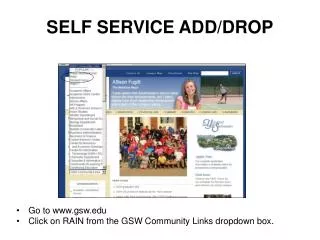
This guide provides a step-by-step process for students at Georgia Southwestern State University (GSW) to add or drop classes using the RAIN system. Start by visiting www.gsw.edu and navigate to RAIN in the Community Links menu. Log in securely, ensuring you change your PIN on the first login. Access Student Services and Financial Aid, click on Registration, and follow the prompts to add or drop classes using their CRNs. Always verify your class schedule periodically throughout the term to ensure accuracy.


Easy Steps for Adding and Dropping Classes via RAIN at GSW
E N D
Presentation Transcript
SELF SERVICE ADD/DROP • Go to www.gsw.edu • Click on RAIN from the GSW Community Links dropdown box.
The first time you login to RAIN the PIN must be changed. ID= gswID PIN=mmddyy (birthday)
Enter CRNs from the class schedule and click submit changes. 2424
Be sure to notice the class(es) registered successfully.
Verify your class schedule on RAIN several times during the term. • Login to the secured site of RAIN. • Choose Student Services and Financial Aid. • Click on Registration. • Choose Select Term. • Click on Student Schedule by Date and Time OR Student Detail Schedule.