Comprehensive Guide for Presenters and Moderators: Effective Communication Tools and Roles
30 likes | 154 Vues
This guide outlines the critical accounts and roles necessary for successful presentations and moderation using Adobe Connect and Flugel.TV. It details the required technology setups, including accounts for moderators and technical teams across different locations. It highlights essential backchannel communication methods, such as Skype and telephone support, and specifies the need for local presenters, moderators, and technical support to ensure seamless communication. Additional materials, including video feeds and discussion interludes, are also addressed to enrich the event experience.


Comprehensive Guide for Presenters and Moderators: Effective Communication Tools and Roles
E N D
Presentation Transcript
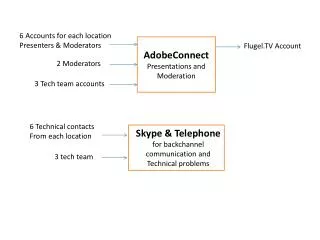
6 Accounts for each location Presenters & Moderators AdobeConnect Presentations and Moderation Flugel.TV Account 2 Moderators 3 Tech team accounts Skype & Telephone for backchannel communication and Technical problems 6 Technical contacts From each location 3 tech team
Flugel.TV AdobeConnect feed Live web TV feed Video feed from St. Martin Video feed from Bittlelbronn Additional video feeds from other locations (eg via skype) Additional material Photos, slides, video clips etc. for the interludes for local discussion. To be sent in advance of the event
Roles • Local Presenter • 1 from each location • Local Moderator • 1 from each location • Co-ordinates local discussion • Collects questions to send to tech team and moderators • Local Tech support • 1 from each location (could also be combined with the moderator role- but preferably not) • Set up and test local installation • Point of contact for global tech team for problem resolution (video, mic, sound etc.)