Understanding Data Types and Arithmetic Operators in Programming
This guide covers the fundamental concepts of data types and arithmetic operators in programming. It explains the specific types of variables including numeric (integer and float), strings, and boolean values. The document highlights how numeric types can be manipulated using arithmetic operators and how strings are handled with string functions. It also explores dynamic data typing, limitations of numeric types in terms of memory allocation, and the differences between integer and float operations. Lastly, the importance of operator precedence and explicit type conversion are discussed for effective programming practices.

Understanding Data Types and Arithmetic Operators in Programming
E N D
Presentation Transcript
Types and Arithmetic Operators CSIS 1595: Fundamentals of Programming and Problem Solving 1
Data Types • Each variable has specific type • numeric types (int and float) • strings • boolean (True or False) • Define capabilities of variable • Numeric types manipulated with arithmetic operators • Strings manipulated with string functions • Booleans used in branching statements
Dynamic Data Typing • Based on current value stored in variable x = 3 xis an integer x = “Fred” xis now a string • Other languages (C, Java, etc.) require type to be set when variable declared and not later changed • Good idea to not change type in middle of program (confusing!) • Can use type function to see current type of variable
Numeric Data Types • Two different numeric types • integer (whole numbers) • floating point (numbers with decimals) • Based on type of literal assigned to variable • No decimal integer • Decimal float • Even if 0 after decimal 2.0is float
Numeric Data Types and Memory • Numeric values must be stored in binary memory • No limit to size of integers in Python • Other languages may limit to fixed storage size(64 bits, etc.) • Problem: Some numbers may require infinite number of digits to store • Example: 1/3 = 0.3333333333333333333333… • Cannot store with complete accuracy on computer!
Float Type and Memory • Python allocates limited number of digits for floats • Usually about 16 digits • 1/3 = 0.3333333333333333 in Python • Affects accuracy of computation • 5 * 2/3 ≠ 2/3 * 5 • Difference between integer and float numbers • integer arithmetic guaranteed to be accurate • float arithmetic not guaranteed
Floats and Exponential Notation • Exponential notation: digits e exponent • Equivalent to digits × 10exponent • Used to store arbitrarily large/small floats with limited number of digits • 0.0000000000000000000000000000123 1.23e-30 • Why called “floating point” numbers
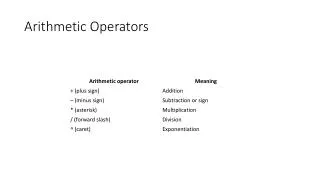
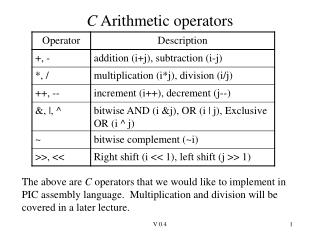
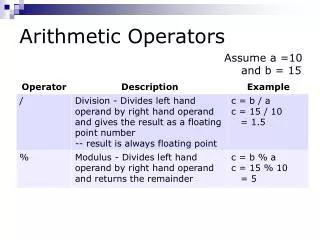
Arithmetic Operators • Basic mathematical operators: + addition - subtraction Also have unary minus -number * multiplication / division ** exponentiation // quotient (like division but truncates result to integer) % remainder (what is left over after quotient) Example: x =23 // 5 4y = 23 % 5 3
Arithmetic Operators and Types • Result type based on operand type • integer op integer integer • float op float float • float op integer or integer op float float • Exception: division • integer / integer float • Even if the operands are divisible! • If need to get a whole number, use // instead
Explicit Type Conversion • Can use type(value) to evaluate value as type x = float(3) 3.0 y = int(3.52) 3 • Used to manually truncate to integer • Not same as rounding! • Can convert strings to/from equivalent numbers s = str(3.52) ‘3.52’ x = float(“3.52”) 3.52 y = int(“3”) 3
Parsing Input to Strings • input function always returns a string • Even if user inputs a number • Must convert to number before manipulating with arithmetic operators • Otherwise get runtime error • Usual form: • Prompt for value (stored in string) • Use int or floatto get correspond numeric value • Manipulate numeric value
Order of Evaluation • x = 7 + 3 * 2 • Is this 20? Is this 13? • Depends on order of evaluationof operators • Rules of operator precedence: • Exponentiation done first • Unary minus done next • Multiplicative operators (*, /, %, //) done next • Additive operators (+, -) done last • Operators at same level done left to right
Parentheses and Precedence • Can use parentheses to change order • Expression in parentheses evaluated before use in rest of expression x = (7 + 3) * 2 20
Incremental Operators • Many statements of form variable = variable op value • Variable changed in terms of current value • Shortcut syntax: variableop= value • Examples: x += 1 same as x = x + 1 x *= 2 same as x = x * 2 …