Download
1 / 4
40 likes | 159 Vues
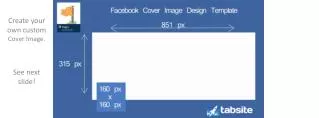
Unleash your creativity with this customizable Facebook cover image template! The provided slide is perfectly sized for Facebook, ensuring no adjustments are needed. Use PowerPoint to insert your images, shapes, and text, selecting your preferred fonts and colors to design a stunning cover image. Remember to keep it simple and focus on 1-2 clear messages for maximum impact. Once complete, save your design as a JPEG or PNG for easy uploading. Download and start designing your unique Facebook presence today!

E N D
Create your own custom Cover Image. See next slide!
How To Use This Template Slide 3 below will be your canvas work area for creating your own custom Facebook cover image! The slide is sized to work with Facebook’s dimensions. No need to adjust anything! To customize this slide, you can add your own images by going to “Insert” in the main PowerPoint Navigation and selecting “Picture” or “Shapes” and produce your own graphics. Add text and use your preferred fonts, background colors, and effects to make your cover photos stand out. We’ve also outlined the area that will be covered up by your main fan page profile/logo photo! Remember, call-outs are great to use, the 20% rule no longer applies!! Just keep your design simple, 1-2 messages maximum for clarity. Once you’re done, simply go to the Office Button (top left) and select “Save As”, then “Other Formats” and JPEG or PNG as the type. This will automatically save your slide as a picture, and you can upload it as your new, custom Facebook cover image. Nice huh?
Like This Template? Please share it! Click on the icons below to share this template. Facebook ShareTweetGoogle+ Share Share This Ebook! Share This Ebook! Share This Ebook! Share This Ebook! in in in in www.hubspot.com www.hubspot.com www.hubspot.com www.hubspot.com














![How to Create a LinkedIn Company Page that Converts [VISUAL GUIDE]](https://cdn4.slideserve.com/7374801/slide1-dt.jpg)