Chapter 8 String
This chapter delves into the fundamentals of handling strings in Java, focusing on the String, Character, and StringBuffer classes. You'll learn about the nature of strings as objects, the immutable nature of the String class, and the flexibility offered by the StringBuffer class for dynamic string manipulation. It includes examples of declaring and initializing strings, utilizing various methods, and highlights the difference between character primitives and the Character class. Lab exercises further reinforce these concepts, making it essential for Java learners.


Chapter 8 String
E N D
Presentation Transcript
Chapter 8 String Lecturer: Ty Rasmey Email: rasmeyt2@gmail.com
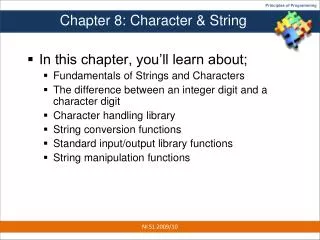
Overview • Introduction • The String Class • The Character Class • The StringBuffer Class
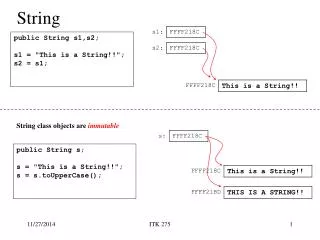
Introduction • A string is sequence of characters. • A string is not an array of character • E.g. in C/C++: char s[10]; • In Java, A String is an object. • Java has 3 String classes: • String • Character • StringBuffer
The String Class • String is in java.lang package. • Since java.lang.*is always imported automatically, we don’t need to import the Stringclass. • Declaration: String s1; • Initialization: s1=“Welcome to Java”; • Or, short-cut: String s1=“Welcome to Java”;
The String class(2) • Because String is a class, then s1 is an object. • So there should be constructors, methods, or properties. • String constructors: • String() • String(String value) • String(char[] value) Ex: String s1 = new String(“npic”); • Since strings are used frequently, Java treats a string literal as a String object. So can say: • String s1 = “npic”;
The String class(3) Summary of String class • Constructors • String() • String(value: String) • String(value: char[]) • Methods • charAt() • compareTo() • concat() • endsWidth() • equals() • getChars() • equalsIgnoreCase() • getChars() • indexOf() • lastIndexOf() • regionMatches() • length() • replace() • startsWith() • subString() • toCharArray() • toLowerCase() • toString() • toUpperCase() • trim() • copyValueOf() • valueOf()
The String class(4) • Q. How do I get those methods to use? • A. You just declare a variable as String. String s1=“Welcome to NPIC”; Then, you call a method, say length() & substring(intbeginIndex, intendIdex). • Let’s try this out: Public class TestString { public static void main(String[] args){ String s1=“Welcome to NPIC”; System.out.println(s1.length()); System.out.println(s1.substring(0,11) + “Java”); } }
The String class(5) Note: • The String class is immutable (has no setter method). • The String class is final so we cannot inherit from it. //Discuss it in chapter 9 • Lab time: • 8.2.11 Example: Checking Palindromes p.270
The Character class • To declare a variable as a character, use primitive data type: char. Ex: char ch1 = ‘a’; • But Java provides also Character class. It is useful for Data Structure. Ex: Character ch2 = new Character(‘b’); Character ch3 = ‘c’; • After define ch2,ch3 as Character, then these can use methods from Character class. Please see methods on section 8.3 page 271. • Lab Time: • 8.3.1 Example on page 272
The StringBuffer class • StringBuffer class is more flexible than String class. Why? • Because after creating a variable from StringBuffer class, we can use add, append, delete, insert etc. very easily. • Example: StringBuffersb = new StringBuffer(“Welcom”); sb.append(“e”);
The StringBuffer class(2) • StringBuffer() • append():StringBuffer • capacity():int • charAt():char • delete():StringBuffer • deleteCharAt():StringBuffer • insert():StringBuffer • length():int • replace():StringBuffer • reverse():StringBuffer • setCharAt():void • setLength():void • subString():String Homework
The StringBuffer class(3) • Append StringBufferst = new StringBuffer(“Welcome"); st.append(‘ '); st.append(“to”); st.append(‘ ’); st.append(“Java"); st.append(2); //output: Welcome to Java2 Please make some note on the code. • StringBuffer provided overloaded methods to append boolean, char, char[], double, float, int, long, String.
The StringTokenizer • Count the number of words in a given String Example: Input: I am studying at NPIC Output: Word Count: 5 words
Test Count word • package teststring; • import java.util.StringTokenizer; public class Countword { • public static void main(String[]args){ • String s = javax.swing.JOptionPane.showInputDialog(""); • StringTokenizer token = new StringTokenizer(s); • System.out.println(""+token.countTokens()); • } • }
Lab Exerise 2 • On page 276, Section 8.4.3 The StringBuffer Class Home work write code page 276 8.3