Understanding Bounding Boxes in Image Processing with MATLAB
This document introduces students in the CS100R course at Cornell University to the concept of bounding boxes and their applications in image processing using MATLAB. It covers key MATLAB expressions, how to identify red pixels, and illustrates the bounding box's role in determining the position and orientation of objects in images. Additionally, it highlights the importance of efficient algorithms for computing bounding boxes and raises questions about their reliability in real-world scenarios. This foundational knowledge is crucial for the upcoming assignments and quizzes within the course.

Understanding Bounding Boxes in Image Processing with MATLAB
E N D
Presentation Transcript
Bounding Boxes, Algorithm Speed Prof. Ramin Zabih http://cs100r.cs.cornell.edu
Administrivia • Assignment 1 released, due next Friday • On the course web page, cs100r.cs.cornell.edu • Look under “Assignments”! • You should all have gotten email from me announcing this • If not, you aren’t yet on CMS • You should also all have lab access and accounts on the lab computers by now • Office hours are coming soon • Quiz 1 is a week from today
Matlab expressions • An expression in Matlab is anything you can type in which has a value • Examples: 3, len, A(1) > A(2), etc. • Can be the RHS of an assignment statement • Most Matlab statements (for, if, etc.) can take expressions as well as numbers for i = EXP1:EXP2 A(i) = EXP3; end; • Some of these EXP’s must evaluate to integers • Which ones?
Count zero’s in a 2D matrix nzeros = 0; [nrows,ncols] = size(B); for row = 1:nrows for col = 1:ncols if (B(row,col) == 0) nzeros = nzeros + 1; end; end; end;
What about red pixels? • A (non-color) image is a 2D array • Brightest = 255, darkest = 0 • A color image is 3 different 2D arrays • For red/green/blue values (RGB) • We provide a way to create these 3 arrays Anyone know why there are 3? • Examples: • red(1,1)==255, blue(1,1) == green(1,1) == 0 • red(2,1) == 100 == blue(2,1) == green(2,1) • red(3,1) == 0 == blue(3,1) == green(3,1)
How many red pixels? img = imread(‘wand1.bmp’); [Red, Green, Blue] = image_rgb(img); nreds = 0; [nrows,ncols] = image_size(img); for row = 1:nrows for col = 1:ncols if (Red(row,col) == 255) nreds = nreds + 1; end; end; end;
Are we done? • We have counted the red pixels in Matlab • Or have we? What can go wrong? • Actually, quite a few things… • Suppose we can pick a good constant instead of 255 • You need to look at Green and Blue also Color perception is really hard! • We’ve answered the question: is there a red light stick? • But the robot needs to know where it is!
Finding the rightmost red pixel • We can always process the red pixels as we find them: right = 0; for row = 1:nrows for col = 1:ncols if (Red(row,col) == 255) right = max(right,col); end; end; end;
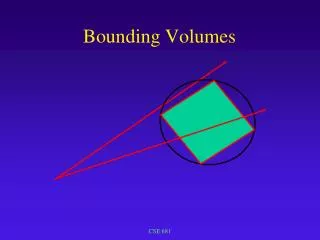
Finding the bounding box • The bounding box of a set of points is the smallest rectangle containing all the points • By “rectangle”, I really mean “rectangle aligned with the X,Y axes” • Bounding box example: • Each red pixel we find is basically a point • It has an X and Y coordinate • Column and row • Note that Matlab reverses the order
What does this tell us? • Bounding box can give us various information about the lightstick • The midpoint of the bounding box tells us roughly where the lightstick is • The aspect ratio give us an idea about its orientation • Ratio of width to height
Compute a bounding box? • Two related questions: • Is this a good idea? Will it tell us reliably where the light stick is located? • It obviously works some of the time • Can we compute it fast? • Lots of CS involves trying to find something that is both useful and efficient • To do this well, you need a lot of clever ways to efficiently compute things (i.e., algorithms) • We’re going to learn a lot of these in CS100R • Including quite a few you’ve never seen
Beyond the bounding box • Computing a bounding box isn’t hard • Hint: the right edge is computed by the code we showed a few slides ago • You’ll write this and play with it in A2 • But it’s not very robust, as you will see • Example: