
Uploaded by
gaenor
2 SLIDES
242 VUES
20LIKES
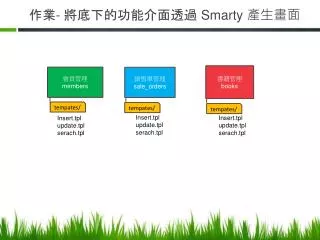
作業 - 將底下的功能介面透過 Smarty 產生畫面
DESCRIPTION
作業 - 將底下的功能介面透過 Smarty 產生畫面. 書籍管理 books. 會員管理 members. 銷售單管理 sale_orders. t e mpate s /. t e mpate s /. t e mpate s /. Insert.tpl update.tpl serach.tpl. Insert.tpl update.tpl serach.tpl. Insert.tpl update.tpl serach.tpl. 查詢. 主畫面. 新增. 刪除. 修改. Click. 事件. Click. Click. Click.
Download
1 / 2
Télécharger la présentation 
作業 - 將底下的功能介面透過 Smarty 產生畫面
An Image/Link below is provided (as is) to download presentation
Download Policy: Content on the Website is provided to you AS IS for your information and personal use and may not be sold / licensed / shared on other websites without getting consent from its author.
Content is provided to you AS IS for your information and personal use only.
Download presentation by click this link.
While downloading, if for some reason you are not able to download a presentation, the publisher may have deleted the file from their server.
During download, if you can't get a presentation, the file might be deleted by the publisher.
E N D
Presentation Transcript
作業- 將底下的功能介面透過 Smarty 產生畫面 書籍管理books 會員管理members 銷售單管理sale_orders tempates/ tempates/ tempates/ Insert.tplupdate.tpl serach.tpl Insert.tplupdate.tpl serach.tpl Insert.tplupdate.tpl serach.tpl
查詢 主畫面 新增 刪除 修改 Click 事件 Click Click Click ShowUpdateListAction ShowDeleteListAction ShowInsertPageAction DoSelectAction Click ShowUpdatePageListAction Click Click DoDeleteAction DoInsertAction Click DoUpdateAction












More Related