Enhancing Education with Web 2.0: Social Software in the Classroom
Explore how Social Software in the classroom leverages Web 2.0 applications to transform learning into an interactive and engaging experience. Discover free tools like blogs, wikis, social networking, and more to create effective learning environments.

Enhancing Education with Web 2.0: Social Software in the Classroom
E N D
Presentation Transcript
Social Software Using Web 2.0 applications in the classroom
Social Software • Changing nature of the web • Was place for storing and finding information • now a platform for communication and socialising • Web 2.0 refers to a different way of using the web rather than to technological advances
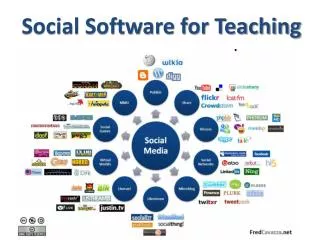
Web 2.0 applications • These are generally free…. Or via affordable annual subscription • Blogs • Wikis
Web 2.0 applications • Others include • Photo sharing - Flickr, Photobucket, Zoomr, Smugmug • Bookmarking - Del.icio.us, Magnolia, Digg • Social Networking - Facebook, Myspace, Bebo, Linked-In (professional) • Photo sharing in plain English • Social bookmarking in plain English • Social networking in plain English
Web 2.0 applications • Still more • Video sharing • YouTube, Mooziko… • Messaging, personal video conferencing • Skype, Messenger, Meebo • Mapping • Google maps, Google Earth (and sky)
Web 2.0 applications • And more • Personal Learning Environments (PLEs) as opposed to Managed and Virtual Learning Environments (MLEs, VLEs) • iGoogle, Netvibes, Plex, Elgg
Other features • Tagging • Tagging enables users to identify information for easy retrieval. • Tag clouds allow one to manage tags • Used in social bookmarking, photo sharing, blogs, wikis • Very powerful tool for managing information of various sorts
Finally… • RSS • Syndication brings information to your desktop, saving you having to go and collect it. • Used for everything … blogs, news, podcasts… • RSS in plain English
Using Social Software in the classroom • Free • Available anywhere, anytime (internet connection required) • New ways of accessing, thinking about, sharing and using information • Effective learning and sharing platform • Real world, meaningful, enjoyable, relevant