Download
1 / 12
120 likes | 249 Vues
This guide provides an in-depth introduction to the essentials of website development with a focus on the role of webmasters. It covers crucial topics such as online services, website development goals, common challenges faced by webmasters, and a simple development cycle. Additionally, it discusses website presentation structures, internal webpage architecture, associated costs, and key terminology relevant to webmasters, allowing you to navigate the complexities of creating and managing websites effectively.

E N D
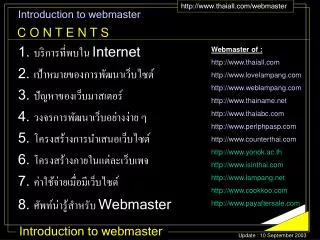
Introduction to webmaster • 1. บริการที่พบใน Internet • 2. เป้าหมายของการพัฒนาเว็บไซต์ • 3. ปัญหาของเว็บมาสเตอร์ • 4. วงจรการพัฒนาเว็บอย่างง่าย ๆ • 5. โครงสร้างการนำเสนอเว็บไซต์ • 6. โครงสร้างภายในแต่ละเว็บเพจ • 7. ค่าใช้จ่ายเมื่อมีเว็บไซต์ • 8. ศัพท์น่ารู้สำหรับ Webmaster C O N T E N T S Webmaster of : http://www.thaiall.com http://www.lovelampang.com http://www.weblampang.com http://www.thainame.net http://www.thaiabc.com http://www.perlphpasp.com http://www.counterthai.com http://www.yonok.ac.th http://www.isinthai.com http://www.lampang.net http://www.cookkoo.com http://www.payaftersale.com Update : 10 September 2003
1. บริการที่พบใน Internet • 1. Electronic mail • 2. Website • 3. IRC (Internet Relay Chat) • 4. ICQ (I seek you) • 5. e-Commerce • 6. e-Learning • 7. e-Banking • 8. Internet phone • 9. Game online • 10. Software updating • 11. Wap, Palm, PocketPC • 12. Usenet news • 13. FTP (File transfer protocol) • 14. Telnet, SSH TOT internet : 1222 Username : U89$0y)9@totonline.net Password : j4**9c+p
2. เป้าหมายของการพัฒนาเว็บไซต์ New technology • 1. รับโฆษณา • 2. e-Commerce • 3. ประชาสัมพันธ์องค์การ • 4. เผยแพร่ข้อมูล ,ขายข้อมูล • 5. ฝึกปฏิบัติ user webmaster
3. ปัญหาของเว็บมาสเตอร์ 1. Data transfer 2. Storage , Web space 3. Hacker , Cracker 4. Incomplete services 5. Unknown 6. No time 7. No service 8. Low hits 9. Low income USER COUNTER INCOME COST
4. วงจรชีวิตการพัฒนาเว็บไซต์ 1. Study the requirement and problem 2. Design (Graphic, database, structure, server) 3. Development (notepad,dream, adobe … ) 4. Upload 5. Test by IE ( Input, Output ) 6. Evaluation + Promotion
5. โครงสร้างการนำเสนอเว็บไซต์ แบบที่ 1. แบบเชิงเส้น ( Linear ) map.htm index.html team.htm product.htm ตัวอย่างคำสั่ง HTML <img src=mypicture.jpg> <a href=product.htm>รายการสินค้า</a> <a href=index.html>กลับหน้าหลัก</a>
5. โครงสร้างการนำเสนอเว็บไซต์ แบบที่ 2. แบบต้นไม้ ( Tree ) index.html product.htm map.htm team.htm
5. โครงสร้างการนำเสนอเว็บไซต์ แบบที่ 3. แบบผสม ( Hybrid ) index.html product.htm map.htm team.htm
6. โครงสร้างภายในแต่ละเว็บเพจ Header infomation Menu Link Footer
7. ค่าใช้จ่ายเมื่อมีเว็บไซต์ Domain name (ประมาณ 600 ต่อปี) Web hosting (ประมาณ 400 ต่อเดือน) • Data transfer • Web space • E-mail • Speed ( Thai, US ) • Security, Backup • FTP, File manager • PERL, PHP, ASP, .NET • MYSQL, MDB • SSL, e-Commerce • Brand + experience
8. ศัพท์น่ารู้สำหรับ Webmaster HTML (Hypertext Markup Language) CSS (Cascading Style Sheets) JAVA script, JAVA.CLASS PERL, PHP, ASP, JSP META, Search engine, Portal web LINUX, REDHAT, TLE, OSDN COUNTER, TRACKER e-Commerce, e-Learning, Security, Law, Bank
<html><head><title>Thaiall.com :: introduction to webmaster</title> <meta http-equiv=content-type content="text/html; charset=windows-874"> <meta name=keywords content="teach,study,learn"> <meta name=description content="How to teach the programming."> <style type="text/css"> body{scrollbar-base-color:yellow;font-family:MS Sans Serif;font-size:10px} a:link{color:red; font-family:ms sans serif;} a:visited{color:purple; font-family:ms sans serif;} a:hover{color:blue;text-decoration:underline; font-family:ms sans serif;} td{font-size:10pt;font-family:ms sans serif;} </style> </head> <body> THANK YOU </body> </html> • THANK YOU









![Introduction [1/2]](https://cdn1.slideserve.com/3558468/slide1-dt.jpg)