Configuring Virtual Networks in VMware ESX Using CLI: A Comprehensive Guide
50 likes | 175 Vues
This guide provides detailed steps for configuring physical NICs, virtual switches, and VMkernel ports in VMware ESX using the command line interface (CLI). Topics include setting up NIC speed options for multiple vmnics, creating and modifying virtual switches, adding service console ports, and configuring VLANs. The guide also covers key command parameters and network performance optimization techniques, such as NIC teaming. Suitable for network administrators and IT professionals seeking to enhance their virtual network configurations.


Configuring Virtual Networks in VMware ESX Using CLI: A Comprehensive Guide
E N D
Presentation Transcript
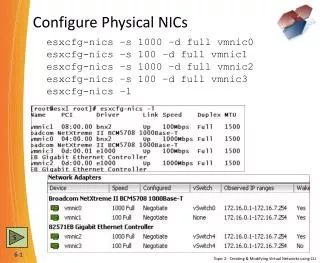
Configure Physical NICs esxcfg-nics –s 1000 –d full vmnic0 esxcfg-nics –s 100 –d full vmnic1 esxcfg-nics –s 1000 –d full vmnic2 esxcfg-nics–s 100 –d full vmnic3 esxcfg-nics –l 5 Topic 2: Creating & Modifying Virtual Networks using CLI
Configure Virtual Switches esxcfg-vswitch–a vSwitch4:64 esxcfg-vswitch–A PortVLAN101 vSwitch4 esxcfg-vswitch–A PortVLAN102 vSwitch4 esxcfg-vswitch –v 101 –p PortVLAN101 vSwitch4 esxcfg-vswitch –v 102 –p PortVLAN102 vSwitch4 esxcfg-vswitch–L vmnic2 vSwitch4 esxcfg-vswitch–L vmnic3 vSwitch4 VMNIC4 7 Topic 2: Creating & Modifying Virtual Networks using CLI
Configure the VMkernel Port esxcfg-vswitch–a vSwitch4:16 esxcfg-vswitch–A VMotionvSwitch4 esxcfg-vswitch–L vmnic2 vSwitch4 esxcfg-vswitch–L vmnic3 vSwitch4 esxcfg-vmknic–a –i 172.16.10.1 –n 255.255.0.0 VMotion vimsh -n -e “/hostsvc/vmotion/vnic_setVMotion” esxcfg-route 172.16.1.1 esxcfg-route –a 10.0.0.0 255.255.0.0 172.16.1.254 esxcfg-route –l 9 Topic 2: Creating & Modifying Virtual Networks using CLI
Adding a second Service Console esxcfg-vswitch –a vSwitch4:16 esxcfg-vswitch –L vmnic2 vSwitch4 esxcfg-vswitch–L vmnic3 vSwitch4 esxcfg-vswitch–A SCon2 vSwitch4 esxcfg-vswif–a –i172.16.9.1 -n 255.255.0.0 -p SCon2 vswif1 esxcfg-vswitch–A IPStorage vSwitch4 esxcfg-vmknic–a –i 172.16.10.1 –n 255.255.0.0 IPStorage esxcfg-vswitch –v 33 –p SCon2 vSwitch4 esxcfg-vswitch –v 33 –p IPStorage vSwitch4 9 Topic 2: Creating & Modifying Virtual Networks using CLI
Chapter 6 Review Questions • In VMware ESX 3.5, what is the maximum number of ports that you can create on a virtual switch using the Virtual Infrastructure Client (VIC)? A. 56 C. 1016 B. 504 D. 1024 2. You need the best network performance possible for your VM, what technology do you implement to do so? A. NIC Teaming on the Virtual Switch C. VLANs B. NIC Teaming in the Virtual Machine D. Traffic Shaping 3. In VMware ESX 3.5, what type of port needs to be created to support VMotion? A. VMkernel port C. Virtual Machine Port B. Service Console Port D. VoIP port 4. In VMware ESX 3.5, what does the command esxcfg-vswitch –A Production vSwitch2 do? A. Adds a portgroup named vSwitch2 to the virtual switch named Production B. Unlinks a NIC named Production from to the virtual switch named vSwitch2 C. Sets the VLAN ID for the virtual switch named vSwitch2 to Production D. Adds a portgroup named Production to the virtual switch named vSwitch2