Understanding Sequences and Indexing in Programming
This guide provides an overview of sequences in programming, describing them as finite, ordered collections indexed by non-negative integers. Examples include lists, strings, and tuples. The document illustrates how to access elements using indexing, starting at zero, and demonstrates the use of the `len` function to determine sequence length. It also covers looping through items with specific techniques, including iterating over halves and even-indexed items. Understanding indexing and iteration is fundamental for effective programming.

Understanding Sequences and Indexing in Programming
E N D
Presentation Transcript
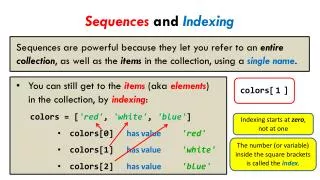
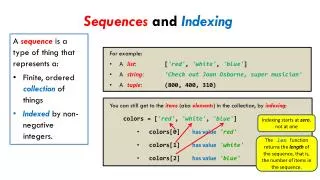
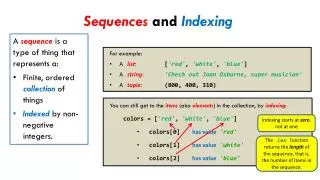
Sequencesand Indexing • A sequenceis a type of thing that represents a: • Finite, ordered collectionof things • Indexed by non-negative integers. • For example: • A list: ['red', 'white', 'blue'] • A string: 'Check out Joan Osborne, super musician' • A tuple: (800, 400, 310) • You can still get to the items(aka elements) in the collection, by indexing: • colors =['red', 'white', 'blue'] • colors[0]has value 'red' • colors[1]has value 'white' • colors[2]has value 'blue' Indexing starts at zero, not at one The len function returns the length of the sequence, that is, the number of items in the sequence.
circle = zg.Circle(...) colors =['red', 'white', 'blue', ...] circle.setFill(colors[0]) circle.setFill(colors[1]) circle.setFill(colors[2]) ... Looping (“iterating”) through the items circle = zg.Circle(...) colors =['red', 'white', 'blue', ...] for k in range( ): circle.setFill(colors[ ]) forkinrange(len(BLAH)): ... BLAH[k] ... len(colors) k Be sure that you understand the use of the index k in the above example. It is not a “magic” symbol; it is just an ordinary variable that goes 0, 1, 2, ... per the range statement. Do you see now why the range statement is defined to start at 0 and ends one short of the value of its argument?
Looping (“iterating”) through the items forkinrange(len(BLAH)): ... BLAH[k] ... In all these examples, assume that BLAH has 7 items in it. BLAH[0] BLAH[1] BLAH[2] ... BLAH[6] Iterate through the first half of BLAH: BLAH[0] BLAH[1] ... BLAH[2] forkinrange( len(BLAH) // 2 ): ... BLAH[k] ... Iterate through the second half of BLAH: BLAH[3] BLAH[4] ... BLAH[6] forkinrange( len(BLAH) // 2, len(BLAH) ): ... BLAH[k] ... Iterate through BLAH, backwards: BLAH[6] BLAH[5] ... BLAH[0] forkinrange( len(BLAH) - 1, -1, -1 ): ... BLAH[k] ... Go DOWN by one each iteration Stop when you reach -1 Iterate through the even-numbered items in BLAH: BLAH[0] BLAH[2] BLAH[4] ... BLAH[6] forkinrange( 0, len(BLAH), 2 ): ... BLAH[k] ... Go up by TWO each iteration
Looping (“iterating”) through the items forkinrange( len(BLAH) // 2 ): forkinrange(len(BLAH)): ... BLAH[k] ... forkinrange( len(BLAH) // 2, len(BLAH) ): forkinrange( len(BLAH) - 1, -1, -1 ): forkinrange( 0, len(BLAH), 2 ): def evens(numbers): count = 0 for k inrange(len(numbers)): if numbers[k] % 2 == 0: count = count + 1 return count """ Returns the number of even integers in the given sequence. Precondition: The argument is a sequence containing integers. """ [8, 13, 7, 5, 6, 6, 9] -> 3