Understanding RGB, CMY, and HSV Color Models in Digital Media
120 likes | 335 Vues
This article explores three major color models: RGB (Additive), CMY (Subtractive), and HSV (HSB). The RGB model, used in screens, begins with black and adds colors (Red, Green, Blue) to create a spectrum, ultimately reaching white. In contrast, the CMY model, often used in printing, starts with white and adds colors, resulting in darker shades. Additionally, the HSV model breaks color into three components: Hue, Saturation, and Value, enabling a more intuitive understanding of color manipulation in graphic design software. Learn to convert between these models for enhanced digital design.


Understanding RGB, CMY, and HSV Color Models in Digital Media
E N D
Presentation Transcript
Color Models • RGB Color Model • CMY Color Model • HSV(HSB) Color Model
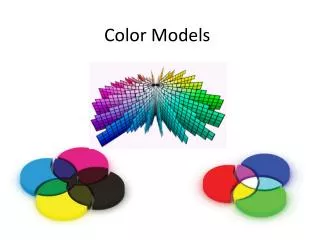
RGB Color Model • Additive in nature : Color mixing begins with black and ends with white as more color is added. • Used in screens ( T V , Monitors , Mobiles ) • R = (1, 0, 0) • G = (0, 1, 0) • B = (0, 0, 1) • R + G = (1, 0, 0) + (0, 1, 0) = (1, 1, 0) = Y • R + B = (1, 0, 0) + (0, 0, 1) = (1, 0, 1) = M • B + G = (0, 0, 1) + (0, 1, 0) = (0, 1, 1) = C • R + G + B = (1, 1, 1) = W
CMY Color Model • Subtractive in nature : Color mixing means that one begins with white and ends with black; as one adds color, the result gets darker and tends to black. • Used in printers
Conversion • Conversion from RGB to CMY • Conversion from CMY to RGB
HSV Color Model • Anyone with a monitor has probably heard of the RGB color space. • If you deal with printers, you know about CMYK • HSV (HSB) is used in your graphics software. • Hue is expressed as a number from 0 to 360 degrees • Saturation is how pure (vs. dull) the color is, ranging from 0 to 100, where 100 is fully saturated • Value or brightness describes the intensity of the color from zero percent to 100 percent.
If Saturation =0 , Value =100 then color displayed is White . • If Brightness is 0 then color displayed in Black