
Uploaded by
hestia
11 SLIDES
576 VUES
110LIKES
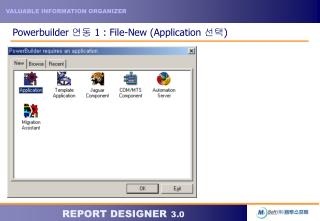
Powerbuilder 연동 1 : File-New (Application 선택 )
DESCRIPTION
Powerbuilder 연동 1 : File-New (Application 선택 ). Powerbuilder 연동 2 : library (rd35.pbl) 생성. Powerbuilder 연동 3 : File-New (Object – Window 선택 ). Powerbuilder 연동 4 : RD OCX 삽입하기 위해 OLE 생성. Powerbuilder 연동 5 : RD OCX 삽입. Powerbuilder 연동 6 : File – Save (Window 저장 ).
Download
1 / 11
Télécharger la présentation 
Powerbuilder 연동 1 : File-New (Application 선택 )
An Image/Link below is provided (as is) to download presentation
Download Policy: Content on the Website is provided to you AS IS for your information and personal use and may not be sold / licensed / shared on other websites without getting consent from its author.
Content is provided to you AS IS for your information and personal use only.
Download presentation by click this link.
While downloading, if for some reason you are not able to download a presentation, the publisher may have deleted the file from their server.
During download, if you can't get a presentation, the file might be deleted by the publisher.
E N D
Presentation Transcript
Powerbuilder 연동 7 : RD OCX에서 mrd 호출 왼쪽의 화면과 같이 window(rd-win) 을 선택하고 mrd를 호출하는 Script 기술 Ole_1.object.fileopen(‘mrd위치’,’’) 기술하고 저장
Powerbuilder 연동 10 : window(rd_win)을 open문 작성 Library(rd35)에서 Open(rd_win)를 기술 하고 저장
Powerbuilder 연동 11 : 실행 결과 File – Run 실행하면 왼쪽과 같은 화면이 출력




More Related