Download
1 / 4
40 likes | 151 Vues
This overview details the features of the student system, including options for student login, profile management, course scheduling, and advisor access. Students can effectively view and edit their profiles, search for courses, and create customized class schedules. The system allows users to manage their academic plans and submit changes with ease. Additionally, it provides logout options and confirmation messages to enhance user experience. Accessing academic resources has never been easier for students aiming to stay organized and informed.

E N D
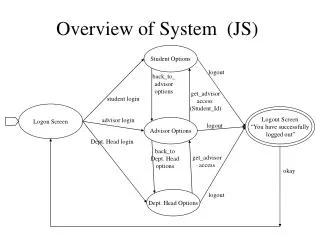
Overview of System (JS) Student Options logout back_to_ advisor options get_advisor access (Student_Id) student login Logon Screen Logout Screen “You have successfully logged out” advisor login Advisor Options logout Dept. Head login back_to Dept. Head options get_advisor access okay Dept. Head Options logout
Student (JS) Student Profile Scheduler Map Generated make schedule view map view/edit student profile D D D login as student Student Options course search Search D view transcript logout D view/edit plan of study Logout Screen D Transcript Plan of Study D = change state
Student Breakdown 1/2 (JS) view/edit student profile view edit save Student Profile View Screen Edit Screen Changes have been saved cancel D D D D okay okay make schedule create schedule register Scheduler, pref. entered Schedule Generated show mod. schedule create new D D D Enter Course Here add | drop D D = change state
Student Breakdown 2/2 (JS) search course search Search, options here Search Results search D D View Screen edit save cancel Edit Screen Changes have been saved view view/edit plan of study D D okay Plan of Study D submit Submitted Successfully D D = change state