
Java Applet for Background and Font Color Customization
This Java applet demonstrates how to change background and font colors using the AWT library. It sets the background color to black and illustrates the usage of graphics methods to draw shapes like lines, ovals, and rectangles. Additionally, it highlights the importance of handling exceptions, such as ArithmeticExceptions when attempting to perform division by zero. This applet serves as a practical example for understanding basic Java graphics and event handling in applets.

Java Applet for Background and Font Color Customization
E N D
Presentation Transcript
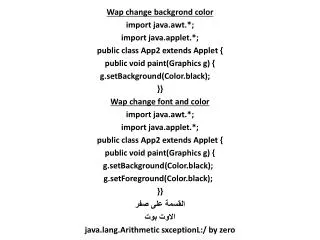
Wap change backgrond color import java.awt.*; import java.applet.*; public class App2 extends Applet { public void paint(Graphics g) { g.setBackground(Color.black); }} Wap change font and color import java.awt.*; import java.applet.*; public class App2 extends Applet { public void paint(Graphics g) { g.setBackground(Color.black); g.setForeground(Color.black); }} القسمة على صفر الاوت بوت java.lang.ArithmeticsxceptionL:/ by zero
import java.awt.*; import java.applet.*; public class app extends Applet { public void paint(Graphics g) { g.drawLine(100,100,100,100); رسم خط g.drawOval(50,50,100,100); رسم دائرة g.drawRect (50,50,100,100); مربع } } /*<applet code=app width=500 height=500></applet>*/