
Uploaded by
jackie
8 SLIDES
184 VUES
80LIKES
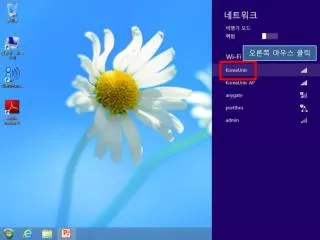
오른쪽 마우스 클릭
DESCRIPTION
오른쪽 마우스 클릭. 보안 탭 클릭. 보안탭의 보안종류 , 암호화유형 , 네트워크 인증방법을 아래와 같이 선택 후 「설정」 버튼 클릭. 서버 인증서 유효성 확인 체크 해제 후 아래와 인증방법 선택 후 「구성」 버튼 클릭. 아래와 같이 체크박스 해제 후 확인. 다시 보안 탭의 [ 고급 설정 ] 버튼 클릭. 아래와 같이 인증모드 지정 후 확인버튼 클릭.
Download
1 / 8
Télécharger la présentation 
오른쪽 마우스 클릭
An Image/Link below is provided (as is) to download presentation
Download Policy: Content on the Website is provided to you AS IS for your information and personal use and may not be sold / licensed / shared on other websites without getting consent from its author.
Content is provided to you AS IS for your information and personal use only.
Download presentation by click this link.
While downloading, if for some reason you are not able to download a presentation, the publisher may have deleted the file from their server.
During download, if you can't get a presentation, the file might be deleted by the publisher.
E N D
Presentation Transcript
보안탭의 보안종류, 암호화유형, 네트워크 인증방법을 아래와 같이 선택 후 「설정」 버튼 클릭
서버 인증서 유효성 확인 체크 해제 후 아래와 인증방법 선택 후 「구성」 버튼 클릭
아래와 같이 인증모드 지정 후 확인버튼 클릭
More Related