Understanding Count-Controlled Loops: Initialization, Testing, and Updating Variables
This chapter covers count-controlled loops, which include an initialization of the loop control variable, a condition to test if the loop should continue running, and an update of the control variable in each iteration. Using examples, we demonstrate how to declare a loop variable, initialize it, and execute repeated actions in Java. A sample code illustrates the structure and behavior of a count-controlled loop, along with outputs that show the current count at each iteration, culminating in a final output indicating completion.

Understanding Count-Controlled Loops: Initialization, Testing, and Updating Variables
E N D
Presentation Transcript
Chapter 5 File Objects and LoopingStatements (Count-controlled Loop Example only)
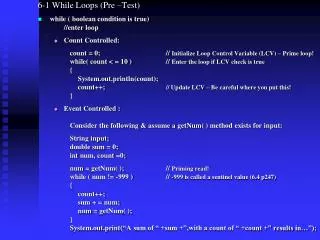
Count-controlled loops contain • An initialization of the loop control variable • An expression to test for continuing the loop • An update of the loop control variable to be executed within each iteration of the body
Count-controlled Pattern int loopCount; // Declare loop variable loopCount = 1; // Initialize loop variable while (loopCount <= 10) // Test expression { . // Repeated actions . . loopCount = loopCount++; // Update loop variable }
Count-controlled Example int count; // Declare loop variable count = 1; // Initialize loop variable while (count <= 4) // Test expression { // Repeated action System.out.println(“count is “ + count); count ++;// Update loop variable } System.out.println(“Done”);
count Count-controlled loop int count; count = 1; while ( count <= 4 ) { System.out.println ( “count is “ + count ); count++; } System.out.println(“Done”); OUTPUT
count 1 int count; count = 1; while ( count <= 4 ) { System.out.println ( “count is “ + count ); count++; } System.out.println( “Done” ); OUTPUT
count 1 int count; count = 1; while ( count <= 4 ) { TRUE System.out.println ( “count is “ + count ); count++; } System.out.println( “Done” ); OUTPUT
count 1 int count; count = 1; while ( count <= 4 ) { System.out.println ( “count is “ + count ); count++; } System.out.println( “Done” ); OUTPUT count is 1
count 2 int count; count = 1; while ( count <= 4 ) { System.out.println ( “count is “ + count ); count++; } System.out.println( “Done” ); OUTPUT count is 1
count 2 int count; count = 1; while ( count <= 4 ) { TRUE System.out.println ( “count is “ + count ); count++; } System.out.println( “Done” ); OUTPUT count is 1
count 2 int count; count = 1; while ( count <= 4 ) { System.out.println ( “count is “ + count ); count++; } System.out.println( “Done” ); OUTPUT count is 1 count is 2
count 3 int count; count = 1; while ( count <= 4 ) { System.out.println ( “count is “ + count ); count++; } System.out.println( “Done” ); OUTPUT count is 1 count is 2
count 3 int count; count = 1; while ( count <= 4 ) { TRUE System.out.println ( “count is “ + count ); count++; } System.out.println( “Done” ); OUTPUT count is 1 count is 2
count 3 int count; count = 1; while ( count <= 4 ) { System.out.println ( “count is “ + count ); count++; } System.out.println( “Done” ); OUTPUT count is 1 count is 2 count is 3
count 4 int count; count = 1; while ( count <= 4 ) { System.out.println ( “count is “ + count ); count++; } System.out.println( “Done” ); OUTPUT count is 1 count is 2 count is 3
count 4 int count; count = 1; while ( count <= 4 ) { TRUE System.out.println ( “count is “ + count ); count++; } System.out.println( “Done” ); OUTPUT count is 1 count is 2 count is 3
count 4 int count; count = 1; while ( count <= 4 ) { System.out.println ( “count is “ + count ); count++; } System.out.println( “Done” ); OUTPUT count is 1 count is 2 count is 3 count is 4
count 5 int count; count = 1; while ( count <= 4 ) { System.out.println ( “count is “ + count ); count++; } System.out.println( “Done” ); OUTPUT count is 1 count is 2 count is 3 count is 4
count 5 int count; count = 1; while ( count <= 4 ) { FALSE System.out.println ( “count is “ + count ); count++; } System.out.println( “Done” ); OUTPUT count is 1 count is 2 count is 3 count is 4
count 5 int count; count = 1; while ( count <= 4 ) { System.out.println ( “count is “ + count ); count++; } System.out.println( “Done” ); OUTPUT count is 1 count is 2 count is 3 count is 4 Done