Network Devices
This insightful exploration covers the various types of network devices essential for connecting and expanding networks. Each device, from repeaters and hubs to switches and routers, plays a specific role in managing data traffic efficiently. You'll learn how repeaters regenerate signals, how switches create isolated channels to reduce collisions, and how routers determine the optimal path for data delivery across layers of the OSI model. This overview highlights the importance of effectively segmenting and managing network traffic for enhanced performance and security.

Network Devices
E N D
Presentation Transcript
Functions of network devices • Separating (connecting) networks or expanding network • e.g. repeaters, hubs, bridges, routers, brouters, switches, gateways • Remote access • e.g. 56K Modems and ADSL modems
A. Expanding Network • Networks cannot be made larger by simply adding new computers and more cables • Less efficient !! • Can install components to • segment (divide) large LAN to form smaller LANs • connect LANs • Required components • Repeaters, bridges, routers, brouters, switches or gateways
a.Repeaters and Hubs • Repeaters or hubs work at the OSI physical layer to regenerate the network’s signal and resend them to other segments • Primitive hub can be viewed as a multiport repeater • It regenerates data and broadcasts them to all ports Hub
Limitations and Features • Cannotjoin segments with different access methods • Do not isolate and filter packets • Can connect different types of media • The most economic way of expanding networks
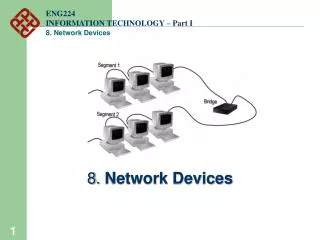
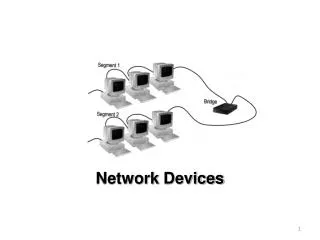
b. Bridges • Has one input and one output • Used to isolate network traffic and computers • Has the intelligent to examine incoming packet source and destination addresses • cannotinterpret higher-level information • cannotfilter packet according to its protocol
Remote Bridges • Bridges are often used in large networks that have widely dispersed segments • Remote bridges can be used to connect remote segments via data-grade telephone line
c. Switches • Switches operate at the Data Link layer (layer 2) of the OSI model • Can interpret address information • Switches resemble bridges and can be considered as multiport bridges • By having multiports, can better use limited bandwidth and prove more cost-effective than bridge Cisco Catalyst 2900 switch
Advantages of Switches • Switches divide a network into several isolated channels (or collision domains) • Reduce the possibility of collision • Collision only occurs when two devices try to get access to one channel • Can be solved by buffering one of them for later access • Each channel has its own network capacity • Suitable for real-time applications, e.g. video conferencing • Since isolated, hence secure • Data will only go to the destination, but notothers
Limitations of Switches • Although contains buffers to accommodate bursts of traffic, can become overwhelmed by heavy traffic • Device cannot detect collision when buffer full
d. Routers • Layer 2 Switches cannot take advantage of multiple paths • Routers work at the OSI layer 3 (network layer) • They use the “logical address” of packets and routing tables to determine the best path for data delivery
Distinguishing Between Bridges and Routers • Bridges forward everything they don’t recognize • Routers select the best path • Routers are layer 3 devices which recognize network address • Bridges are layer 2 devices which look at the sublayernode address
Summary • Repeaters are the least expensive way to expand a network, but they are limited to connecting two segments • Bridges function similar to repeaters, but can understand the node addresses • Switches can be considered as multiport bridges, can divide a network into some logical channels • Routers interconnect networks and provide filtering functions. They can determine the best route