Setting Up Frequently Used Wage Types in CATS for Time Recording
20 likes | 135 Vues
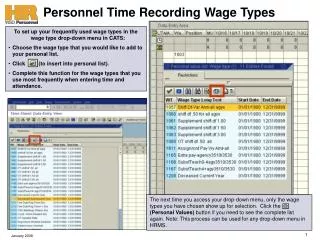
Learn how to customize your wage type drop-down menu in CATS for efficient time and attendance entry. This guide outlines the steps to add frequently used wage types to your personal list. Simply select the desired wage type and insert it into your list for quicker access. The next time you open the drop-down menu, only your selected wage types will appear, streamlining the process. For access to the full wage type list again, click the "Personal Values" button. Note that this process is applicable to any drop-down menu in HRMS.


Setting Up Frequently Used Wage Types in CATS for Time Recording
E N D
Presentation Transcript
Personnel Time Recording Wage Types • To set up your frequently used wage types in the wage type drop-down menu in CATS: • Choose the wage type that you would like to add to your personal list. • Click (to insert into personal list). • Complete this function for the wage types that you use most frequently when entering time and attendance. The next time you access your drop-down menu, only the wage types you have chosen show up for selection. Click the (Personal Values) button if you need to see the complete list again. Note: This process can be used for any drop-down menu in HRMS. January 2008
Personnel Time Recording Wage Types Note: This is not a complete list of all the available wage types in HRMS. January 2008