Download
1 / 1
10 likes | 128 Vues
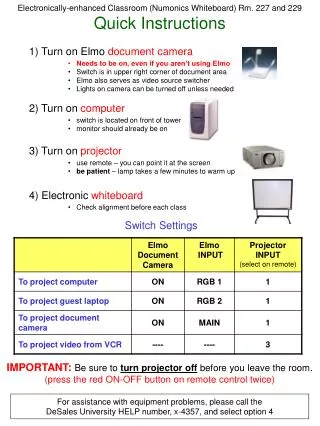
This guide provides essential instructions for operating the electronic equipment in classrooms 227 and 229. Follow these steps to ensure successful use of the Elmo document camera, computer, projector, and electronic whiteboard. Remember to turn off the projector before leaving the room and check the alignment of the whiteboard before each class. For assistance with any equipment issues, contact DeSales University Help at extension 4357, selecting option 4.

E N D
Electronically-enhanced Classroom (Numonics Whiteboard) Rm. 227 and 229Quick Instructions 1) Turn on Elmo document camera • Needs to be on, even if you aren’t using Elmo • Switch is in upper right corner of document area • Elmo also serves as video source switcher • Lights on camera can be turned off unless needed 2) Turn on computer • switch is located on front of tower • monitor should already be on 3) Turn on projector • use remote – you can point it at the screen • be patient – lamp takes a few minutes to warm up 4) Electronic whiteboard • Check alignment before each class Switch Settings IMPORTANT:Be sure to turn projector off before you leave the room. (press the red ON-OFF button on remote control twice) For assistance with equipment problems, please call the DeSales University HELP number, x-4357, and select option 4