
structs
E N D
Presentation Transcript
structs Adapted from Dr. Mary Eberlein, UT Austin
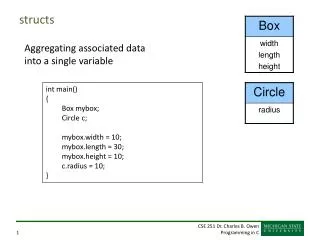
Structures • struct: Collection of variables with one name • the variables are called members or fields • may be different types • Use structs to • keep related data together • pass fewer arguments • return multiple values as a struct
Example structure tag Or use a typedef: typedefstructeeClass{ intclassNum; char meetingRoom[20]; char courseName[30]; } EEClass; EEClass ee312; ee312.classNum = 312; strcpy(ee312.meetingRoom, "EER3"); A struct for data related to our class: structeeClass { intclassNum; char meetingRoom[20]; char courseName[30]; }; • Variable declaration: structeeClass ee312; • Member (or field) access: ee312.classNum = 312;
structs • Record containing related data values that are used together • Fields stored in contiguous memory • Like an array, except: • data values in struct have names • access fields with "dot" operator, not [] Suppose you are writing a class scheduling system. You'd probably need to pass the same set of data to many functions. void catalog(char courseName[], intcourseNumber, intsecID) {…} Instead: combine that data in a struct
Structures structUTCourse { char courseName[50]; intcourseNumber; intsecID; }; structUTCourse EE312_00 = {"Software Design & Implementation I", 312, 16100}; • Now your function might look like this: void catalog(structUTCoursemyClass) {…}
Field Access • Use the dot operator to access fields (and the variable name) typedefstructFullName { char first[20]; char last[20]; } FullName; FullName me = {“Roger", “Priebe"}; printf("Hey %s\n", me.last);
Designated Initializers (C99) typedefstruct name { char first[20]; char last[20]; } FullName; • Value can be labeled with the field name: FullName person = {.last = "Presley", .first = "Elvis"}; • If field omitted from initializer, set to 0
Operations on structs • The . access operator has precedence over nearly all other operators • Example: typedefstruct { intpartNum; char partName[30]; intonHand; } Part; Part part1 = {.partNum = 311, .partName = "usb"}; scanf("%d", &part1.onHand); // . operator higher precedence than & • Assigning one struct to another makes a copy: part2 = part1; // copy each field of part1 into part2 • Note: structscannot be compared with == or !=
Passing structs void printName(struct Name p) { printf("First name: %s\n", p.first); printf("Last name: %s\n", p.last); } Function call: printName(person); Output: First name: Elvis Last name: Presley
struct return values struct Name makeAName(char *firstName, char* lastName) { struct name elvis; strcpy(elvis.first, firstName); strcpy(elvis.last, lastName); return elvis; } Function call: struct Name theKing = makeAName("Elvis", "Presley");
Example Output: First name: Bruce Last name: Lee Firstname: Bruce Last name: Lee #include<stdio.h> #include<string.h> typedefstruct { char first[20]; char last[20]; } FullName; void printName(FullNamep); FullNamemakeAName(char *firstName, char *lastName); int main() { FullNameonePerson = makeAName("Bruce", "Lee"); printName(onePerson); FullNamesomeone = onePerson; printName(someone); }