Download
1 / 2
20 likes | 129 Vues
Elevate your fundraising efforts by personalizing your March for Babies webpage. Log in to marchforbabies.org to access your blue team dashboard. Customize your page by adding a personal photo and story, enhancing your connection with potential donors. Share your updates via email with team members, friends, and family to increase support. Don't forget to save your changes and regularly check back for new dashboard tools. With these simple steps, watch your donations soar and make a difference for babies in need.

E N D
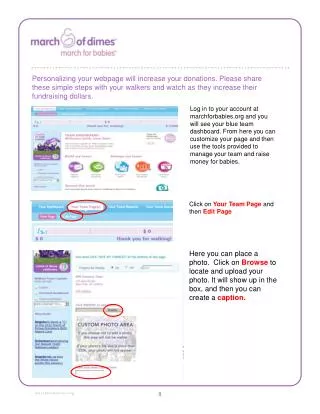
Personalizing your webpage will increase your donations. Please share these simple steps with your walkers and watch as they increase their fundraising dollars. Log in to your account at marchforbabies.org and you will see your blue team dashboard. From here you can customize your page and then use the tools provided to manage your team and raise money for babies. Click on Your Team Page and then Edit Page Here you can place a photo. Click on Browse to locate and upload your photo. It will show up in the box, and then you can create a caption. 8
Once you have your photo selected, you can share your story. Be sure to scroll to the bottom and click Save My Changes when done. Now you can email your personal story to team members, family, friends — everyone you know! Click on Send Team E-mails. Use your own email system or the March for Babies Online Fundraising Tool. If you are a returning team, your address book is already here from last time. Remember to check back often and log on to use the dashboard tools — the action place for your team! Thank you for joining to march to help babies. 9









![[[Click on topic to view page]]](https://cdn2.slideserve.com/5272231/slide1-dt.jpg)