
Uploaded by
lindsey
6 SLIDES
171 VUES
60LIKES
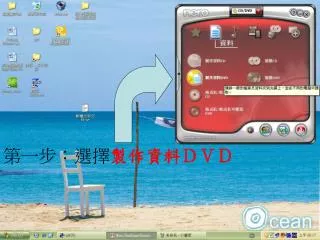
第一步:選擇 製作資料DVD
DESCRIPTION
第一步:選擇 製作資料DVD. 第二步 選擇 增加. 第三步 選擇完您所要備份的檔案後,選擇 增加. 第四步 增加完畢後,再選擇 關閉. 第五步 選擇左邊 箭頭 ,出現選單,選擇 寫入速度 為 4X. 第六步 最重要的,一定要勾選 允許以後能增加檔案(多重區段光碟) 選項. 第七步 確認以上步驟無誤後 ,就可以按下 燒錄 ,靜靜等待囉. 危險 燒錄期 間請勿同時執行其他工作, 請讓電腦專一執行燒錄作業, 避免燒錄失敗.
Download
1 / 6
Download Presentation

Télécharger la présentation
第一步:選擇 製作資料DVD
An Image/Link below is provided (as is) to download presentation
Download Policy: Content on the Website is provided to you AS IS for your information and personal use and may not be sold / licensed / shared on other websites without getting consent from its author.
Content is provided to you AS IS for your information and personal use only.
Download presentation by click this link.
While downloading, if for some reason you are not able to download a presentation, the publisher may have deleted the file from their server.
During download, if you can't get a presentation, the file might be deleted by the publisher.
E N D
More Related

Audio
Live Player